

OpenClaw VPS Hosting
OpenClaw VPS With Secure Tunnel UI
Keep a private OpenClaw gateway on your server. Ubuntu 24.04 image includes the daemon and systemd service, plus an SSH-tunnel dashboard and full root access.

 Trustpilot
There’s a reason 119,000+ developers & businesses choose us.







Money-Back Guarantee

Online Support

Network Speed

Network Uptime
What is OpenClaw VPS?
-
DDoS Protection

-
Various Payment Methods Available
-
Full Admin/Root Access
-
Latency-Free Connectivity


Why Choose Cloudzy’s OpenClaw VPS Hosting
Unlock the Power of Flexibility and Performance
One-Click Image on Ubuntu 24.04
Start from a Marketplace image provisioned by cloud-init that installs OpenClaw and Node.js, sets up systemd, and keeps the gateway running after reboots. SSH in as root and begin onboarding.

Performance for always-on agents
Dedicated vCPUs, DDR5 memory, and NVMe storage keep logs, workspaces, and browser runs responsive. Starts at 1 vCPU and 2 GB RAM, scales up for more channels.
Safer changes with snapshots
Take VPS snapshots before adding skills, editing /root/.openclaw/openclaw.json, changing auth, or testing a new channel. Roll back in minutes after a bad update, without rebuilding the whole server.
Security and access control
Keep the Control UI on localhost, reach it via SSH tunneling, and use tokens from gateway.auth. Dedicated IP plus root access lets you set firewall rules and SSH keys.
Support, uptime, and billing fit real workloads
A 99.99% uptime SLA and 24/7 support keep your assistant online. Hourly billing lets you test bigger plans during busy weeks, then scale back.
install in 60 seconds
How to Set Up an OpenClaw VPS
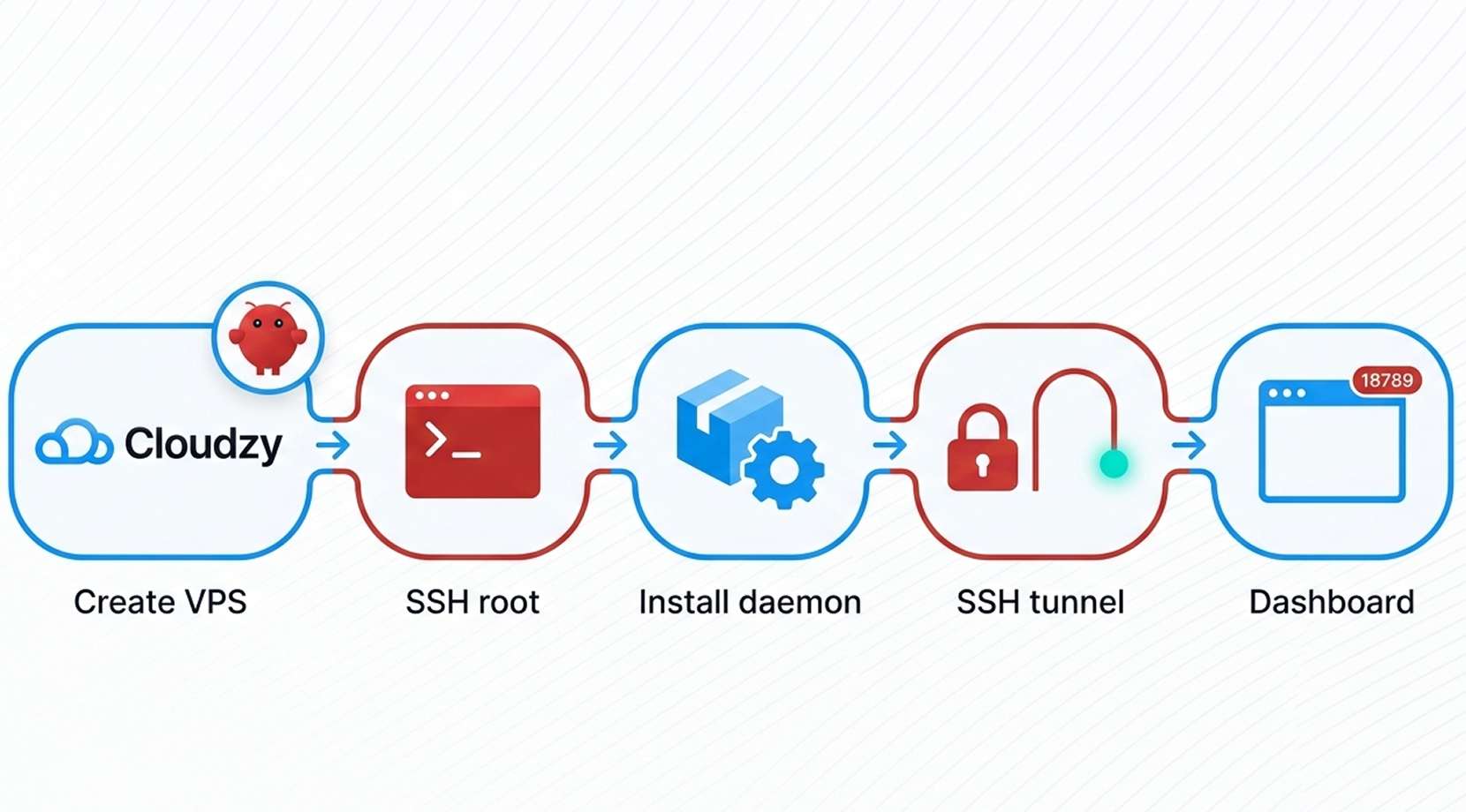
Setting up Cloudzy’s OpenClaw VPS is simple. Create the server, SSH in as root, run openclaw onboard --install-daemon, then open the dashboard via an SSH tunnel on port 18789. Follow our OpenClaw Server VPS guide below for the full walkthrough.
16+ Locations. Because Every Millisecond Matters
Deploy your VPS closer to users for optimal performance.


0Gbps Network Speed

0.00% Network Uptime

<0ms Average Latency

0/7 Monitoring





 Romania
Malaysia
Tokyo
Sydney
Romania
Malaysia
Tokyo
Sydney
Cloudzy, Through Our Users’ Words
Hear how 119318 developers make Cloudzy part of their workflow.
Engineering Without Interruptions



FAQ | OpenClaw VPS Hosting
What is an OpenClaw VPS used for?
It runs a local gateway that connects chat channels to tools like file operations and browser automation. You interact in chat or the dashboard, while data stays on your own server.
How does an OpenClaw VPS Control UI work?
The dashboard is served on port 18789 and uses a token or password for access. On a headless server, people typically reach it via localhost plus SSH tunneling.
What does openclaw onboard --install-daemon change on an OpenClaw VPS?
It walks you through auth and channel choices, writes config, and installs a system service so the gateway keeps running in the background. After reboot, the service starts again.
Which messaging channels can an OpenClaw VPS connect to?
Core channels include WhatsApp, Telegram, Discord, Slack, Signal, and Google Chat, plus others via plugins. Channels can run at the same time, and replies go back to the source chat.
How do updates and skills work in an OpenClaw VPS setup?
OpenClaw can load bundled or community skills and you can update plugins from the CLI. Treat skills like code: review sources, limit permissions, and take a snapshot before installing new ones.
How do I access Cloudzy OpenClaw VPS after setup?
SSH in as root, run openclaw dashboard, then forward port 18789 with an SSH tunnel and open localhost in your browser. This is a common setup for OpenClaw on VPS.
What performance should I expect from Cloudzy OpenClaw VPS hosting?
Dedicated vCPUs, DDR5 RAM, and NVMe keep the gateway, logs, and workspace quick. Up to 40 Gbps network capacity helps when your OpenClaw cloud runs web tools or many chat channels.
Does Cloudzy OpenClaw VPS include snapshots and hourly billing?
Yes. Take VPS snapshots before config edits or skill installs, then roll back fast. Hourly billing makes it easy to test a larger VPS for OpenClaw during peak weeks.
Is Cloudzy OpenClaw VPS secure by default?
It ships on Ubuntu 24.04 with full root control so you can set firewall rules, SSH keys, and bind the dashboard to localhost. Older guides may say MoltBot VPS or ClawdBot VPS, but hardening is similar.
Can I scale Cloudzy OpenClaw VPS as my automations grow?
Yes. Resize CPU, RAM, or NVMe storage as channels and workflows expand, and keep the same static IP. A 99.99% uptime SLA and 24/7 support help keep automation online.
Need help? Contact our support team.
 Submit a Ticket
 No Setup Fees
Deploy in 60 Seconds
Cancel Anytime
No Setup Fees
Deploy in 60 Seconds
Cancel Anytime
