

A voice server should stay online when everyone’s PC is off. The Best TeamSpeak Hosting choice depends on what you want to buy: a ready TS3 service with a fixed slot allowance, or a VPS (virtual private server) that you configure and maintain.
Best TeamSpeak Hosting Prices and Purchase Models
Slots count concurrent connections, including listeners. Your group’s total membership is a separate number. A VPS buys computing resources and leaves TeamSpeak’s software allowance and hardware limits intact. Compare the invoice’s purchase unit first: a slot service and a VPS bill cover different responsibilities.
| Provider | Purchase Model | Choose When | Main Limitation |
|---|---|---|---|
| Cloudzy TeamSpeak VPS | Self-managed VPS | You want an app-assisted start with root control | You own ongoing server upkeep |
| DigitalOcean | Basic Regular Droplet; DIY infrastructure | You already administer Droplets and Linux | Installation and service upkeep remain yours |
| Vultr | Cloud Compute; DIY infrastructure | You prefer a documented manual TS3 setup | You perform and maintain the installation |
| GameServers.com | TS3 slot service | Panel controls and configuration recovery take priority | Discrete bands can leave unused capacity |
| Host Havoc | TS3 slot service | You value setup and a support contact | Minimum and larger bands affect the purchase |
Our TeamSpeak VPS offer comes at $3.48/month for 1 GB RAM, 1 vCPU, 25 GB NVMe and 1 TB transfer. DigitalOcean’s Droplet pricing lists the compared Basic Regular allocation at $6/month: 1 GiB RAM, 1 shared vCPU, 25 GiB SSD and 1,000 GiB transfer.
Host Havoc’s TS3 offer lists $0.20/slot, with a displayed 20-slot minimum costing $4 for one month. GameServers.com’s TS3 page lists capacity bands including 10, 25 and 50 slots. These October 2026 offers describe different purchases; VPS specs are allocations, not TeamSpeak requirements or tested capacities. GB and GiB retain the vendors’ labels. A transfer allowance is the included data quota.
Where Each Provider Fits
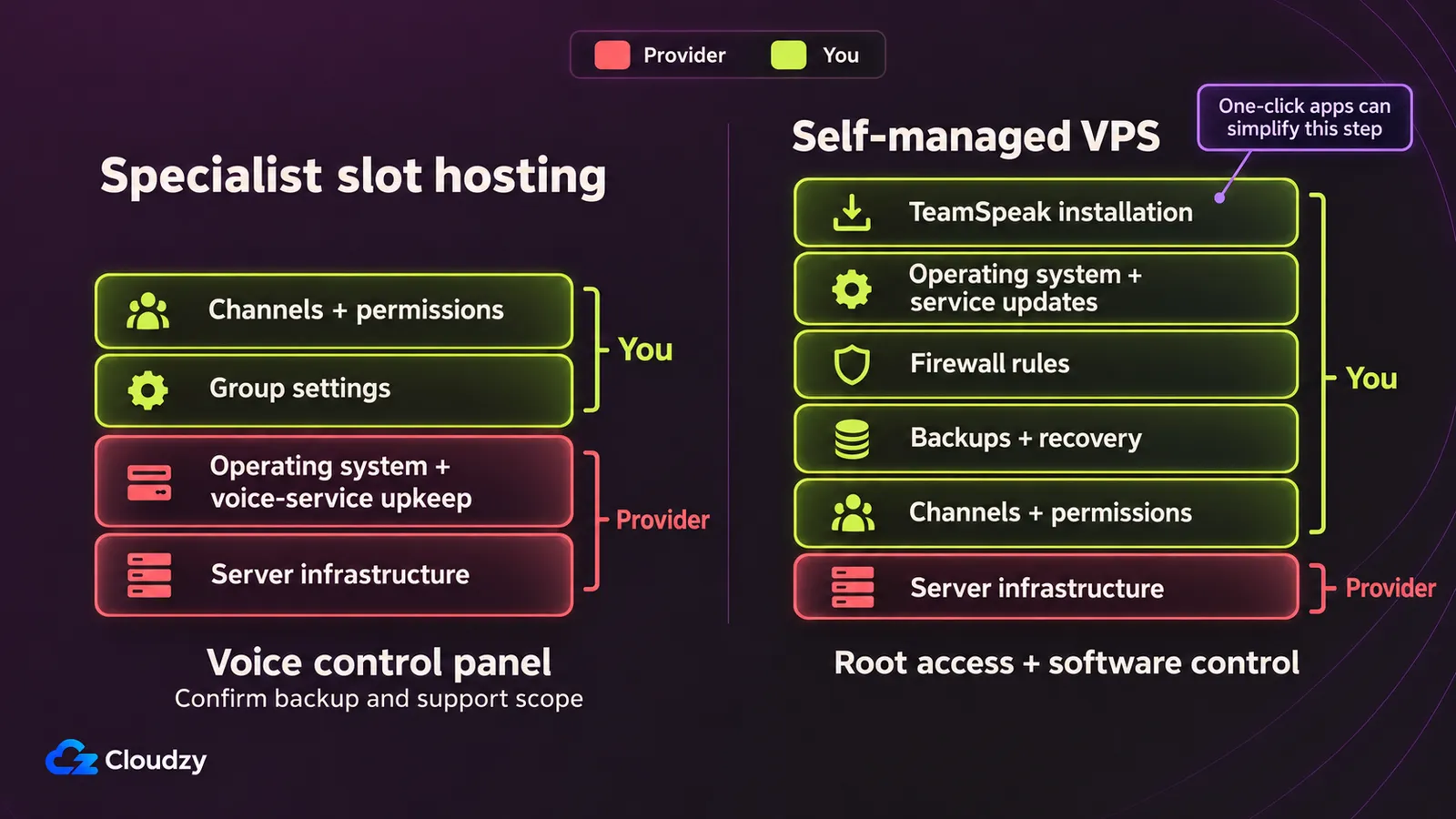
A panel that starts your voice server and a server you administer yourself remove different amounts of work. Choose the provider whose documented workflow fits what you’re prepared to own afterward. Initial deployment, configuration recovery, and access to support deserve separate consideration; a lower invoice doesn’t settle those questions.
Cloudzy for an App-Assisted VPS Start
Choose our one-click TeamSpeak server when you want an app-assisted start and accept responsibility for the VPS afterward. Our documented TeamSpeak deployment gives you an initial installation shortcut with root access (administrator control over the server). That combination fits custom configuration, provided someone will maintain the operating system and voice service.
Our TeamSpeak app instructions describe connecting to the installed service and obtaining initial administrator access. Compared with Vultr’s documented manual TS3 installation, this app-assisted start reduces initial installation work. Vultr’s route lets you inspect and control those steps yourself.
The con is ongoing administration. App-assisted deployment doesn’t make the voice service managed: you still own updates, firewall rules, backups, and access. A successful first connection is the start of that responsibility, it doesn’t complete the maintenance job. In return, you control what runs on your server, how it’s configured, and when updates are applied.
DigitalOcean for Familiar DIY Infrastructure
Choose DigitalOcean when you’re already comfortable with Droplets and Linux administration. Its published allocation and configurable firewall rules give a clear basis for a DIY TeamSpeak setup. Familiarity is an advantage when it reduces the new infrastructure work, but someone still has to install and maintain the voice service.
DigitalOcean’s firewall documentation describes custom UDP and TCP rules with configurable ports. The pro is explicit network control: you can define the traffic the service needs instead of treating connectivity as an unexplained part of setup.
The con is that this infrastructure purchase leaves application work with you. Budget for installation and service upkeep; the compared offer doesn’t establish a managed TeamSpeak service. Platform familiarity is a useful reason to choose it, without implying a voice-quality advantage.
Vultr for a Documented TS3 Install Path
Choose Vultr when you prefer handling the installation and service configuration yourself. Its official TS3 guide supplies a concrete Linux workflow, including a separate service user and startup management. That suits deliberate control over setup, provided you also obtain an acceptable current infrastructure quote before committing to the purchase.
Vultr’s guide describes creating a systemd service (Linux’s service manager) and retrieving the initial administrator privilege key. The pro is a documented path through the manual work, so you can inspect the installation steps before buying.
The con is performing and maintaining the installation. Its older Ubuntu guide establishes the workflow, not a current operating-system recommendation. Before buying, check current deployment guidance and the selected allocation’s invoice.
GameServers.com for Panel and Backup Convenience
Choose GameServers.com when you want to operate a voice service through a panel and value configuration recovery. Its TS3 product page describes controls and backups that reduce the need to administer a general server. That is a useful fit when routine voice administration matters more than owning the underlying box.
The pro is specific: the vendor documents stop, start, and configure controls, plus automatic configuration backups and custom backup options. Those capabilities answer practical questions about changing settings and recovering configurations.
The con is buying capacity in discrete bands, which can leave you paying for unused connections. Panel access also doesn’t establish general VPS or root control. Compare the voice-service functions you need with the panel’s documented scope before treating it as a substitute for your own server.
Host Havoc for Setup and Support Convenience
Choose Host Havoc when reducing initial server work and having a support contact matter more than root-level flexibility. Its TS3 offer makes setup and support part of the service proposition. That can justify the purchase when you want help with the hosted voice service and accept its minimum capacity band.
Host Havoc advertises instant setup, DDoS protection, and round-the-clock technical support. The pro is having these service inclusions described with the offer. They are vendor statements; they don’t establish measured support response times or protection quality.
The con is the minimum and band structure. A small group can pay for connections it doesn’t use, and growth may require a larger band. Ask what the support contact handles before assigning it the maintenance work you expect the purchase to remove.
Choosing Between Slots and a VPS
If nobody will maintain the operating system, specialist slot hosting is the more practical purchase. A VPS fits when custom configuration and server control justify ongoing upkeep. Give that work a named owner before buying: an installation shortcut can change the first setup, while maintenance remains an operating commitment.
Suppose you need 32 concurrent connections. Host Havoc’s listed 40-slot band produces a calculated 40 × $0.20 = $8/month. This is arithmetic from its selector and rate, not a tested checkout quote for exactly the capacity you need. GameServers.com also offers discrete capacity bands. Request a current quote for the band and location you need.
Our offer is below DigitalOcean’s compared invoice and Host Havoc’s minimum. Compare that price difference alongside the different service scope. Against GameServers.com’s jump to the next slot band, we bill for VPS resources with root control; software and hardware limits still determine usable capacity.
Before purchase, record:
- The concurrent connections you need, allowing for a busy session.
- The exact server version and group features the selected offering supports.
- Who owns the ongoing server work; specialist service scope should be explicit too.
- The adequate band or allocation, location, billing interval, and actual promotion terms.
For the VPS path, check out our guide on TeamSpeak installation on Linux to cover the deployment sequence. Include our Linux VPS software maintenance in the operating plan alongside access and recovery.
Request the actual adequate offer before paying, then arrange a representative busy-session check. Keep the offer’s terms with your test observations so the purchase decision rests on the service you can order and the workload you plan to run.
Frequently Asked Questions
Is TeamSpeak Still Free?
For consumers and noncommercial groups, TeamSpeak’s agreement §3.2.1 permits one unlicensed TeamSpeak 3 virtual server with up to 32 slots. That is a software allowance; rented infrastructure still costs. It doesn’t establish free commercial hosting, unlimited capacity, or the terms for TS6. Check the generation you intend to run.
How Many Slots Can a 1 GB VPS Handle?
A 1 GB RAM allocation doesn’t establish a reliable TeamSpeak slot count. Software permission and hardware capacity are separate limits. Evaluate the intended workload during a representative busy session and monitor resource use before committing to a capacity target. Treat the advertised allocation as something to assess, not a users-per-GB guarantee.
Is TeamSpeak or Discord Better for a Clan?
Choose TeamSpeak when selecting your host and controlling the voice setup are priorities. Discord lets you create a community through its app or browser, invite friends, and use text and voice channels. Keeping Discord is reasonable when those features and existing member habits fit; check required features and participation first.
How Much Bandwidth Does TeamSpeak Use per User?
Budget TeamSpeak bandwidth from measurements of your group’s sessions. Track peak traffic during representative busy voice sessions and monthly transfer against the chosen allowance. Check connection speed separately from the data quota. Those observations support your workload’s purchase decision; a fixed consumption figure would need workload-specific evidence.
Which Region Should I Choose?
TeamSpeak’s host-selection guidance recommends locations closest to your community. Have participants test routes to candidate locations using provider facilities; GameServers.com advertises voice demos and datacenter changes. A generic edge ping doesn’t prove how the selected voice server behaves. Include participants from different locations in the comparison before settling on a region.
Do I Need a ServerQuery Admin Password?
You need Query credentials when using ServerQuery to administer TeamSpeak. The Official Image credential docs distinguish the generated Query password from a privilege key that grants administrator access in the TeamSpeak client. For that container deployment, check generated credentials/logs; elsewhere follow deployment-specific recovery guidance. Ask a slot host which Query access and credentials it supports.
Discussion
Comments
Sign in to join the discussion.