


Moving WordPress to a VPS gives you choices about resources, software and how several sites share a server. It also raises a question that a specification table cannot answer: who will keep that server working?
The best VPS hosting for WordPress depends on three decisions: which provider fits, who handles administration, and how much capacity your workload needs. This guide compares three self-managed providers, Cloudzy, Hetzner and Vultr, with two managed alternatives, Cloudways and Kinsta. Recommendations reflect documented features and buyer fit.
Start with the provider comparison, or jump to which hosting type fits you to narrow your options.
Best WordPress VPS Hosting Providers at a Glance
These five picks serve different buyers. “Best for” describes our recommendation, rather than a performance award:
Use the management model to build your shortlist first. Then compare the relevant configuration and limitations; a cheaper server can still require more work from your team.
- Cloudzy: affordable self-managed WordPress VPS with one-click deployment, for hands-on owners and developers.
- Hetzner: DIY infrastructure value, especially for experienced operators considering Europe.
- Vultr: flexible cloud deployment, for buyers choosing between compute tiers and locations.
- Cloudways: offers managed cloud WordPress hosting, for agencies and developers seeking platform tools.
- Kinsta: a premium managed WordPress alternative, for buyers prioritizing WordPress operations.
| Provider | Best for | Hosting type | Reference monthly price (2GB RAM) | WordPress deployment | Root access | Major limitation |
|---|---|---|---|---|---|---|
| Cloudzy | Installer plus control | Self-managed VPS | 2 GB: $7.48 including WordPress | One-click app | Yes | Customer administration |
| Hetzner | Experienced EU operators | Self-managed cloud VPS | CPX12: €14.27 excluding IPv4/VAT | App image | Yes | Variable shared-CPU performance |
| Vultr | Compute/location choice | Self-managed cloud compute | Regular 2 GB: $12 with IPv4 and Backups | One-click app | Yes | Recovery costs extra |
| Cloudways | Managed cloud tools | Managed cloud, Flexible | Flexible (DigitalOcean Basic Standard, 2 GB): $24 | Platform deployment | No | Platform restrictions |
| Kinsta | WordPress operations | Managed WordPress | Single 20GB bandwidth: $35 regular monthly | Site wizard | No; SSH available | Site/usage limits |
These are selected WordPress-capable configurations, with different service scopes. Prices were checked on October 2026 against Hetzner's cloud catalogue, Vultr's catalogue, Cloudways and Kinsta. Hetzner excludes VAT; taxes and optional services can increase the other bills. Check the selected region and billing cycle before ordering.
Managed vs. Self-Managed WordPress VPS: Which Is Right for You?
Self-Managed WordPress VPS: Full Control, More Responsibility
Our services, Hetzner and Vultr give you root access to a Linux server. You can choose software, configure services and install WordPress through an application image or manually. That freedom suits vibe-coders, developers, capable agencies and experienced owners who have someone accountable for operations.
That person must maintain the operating system, web server, PHP and database, arrange backups, monitor failures and investigate problems. An installer shortens setup; it does not take over security or recovery.
Our WordPress VPS also comes with a one-click WordPress deployment at no additional cost. Plans start at $7.48/month. Simply select your desired plan, and you will have WordPress running in minutes.
Managed VPS vs. Managed WordPress Hosting
A managed VPS includes an agreed scope of server administration. That label alone does not establish who fixes plugins or tests checkout after an update.
Cloudways adds a management platform over cloud infrastructure. Kinsta provides a WordPress-specific environment. Both reduce server work while restricting direct customization. Their support and application-maintenance boundaries still matter.
| Task | Self-managed VPS | Managed WordPress/cloud |
|---|---|---|
| OS updates | Customer | Generally provider |
| Server configuration | Customer | Provider/platform |
| WordPress installation | Customer or installer | Typically automated |
| WordPress updates | Customer | Check plan and add-ons |
| Backups | Customer arranges/enables | Check inclusion, fees and scope |
| Root access | Yes | No |
| Troubleshooting | Customer; infrastructure support | Contracted support scope |
Which hosting type fits you?
- Unmanaged VPS: Choose this if you, your agent, or your team will handle server configuration, security, updates, backups, and recovery alongside WordPress.
- Managed VPS: Choose this if you want a VPS environment but need the provider to administer the server. Confirm which tasks are included and whether your required software and access are supported.
- Managed WordPress: Choose this if you want a WordPress-focused platform and can work within its configuration limits. Check responsibility for plugin and theme updates, troubleshooting, and backups; these are not automatically included.
A smaller budget does not remove the need for maintenance. Once you know which arrangement fits, compare providers for deployment, recovery, and total cost.
Best Self-Managed VPS Hosting Providers for WordPress
All three providers offer WordPress installation assistance and root access. Their differences become more useful when you compare a specific plan, location and recovery arrangement.
1. Cloudzy, Best for Affordable WordPress VPS with One-Click Deployment
Our service suits buyers who have an administrator and want a documented route from VPS creation to WordPress setup. Our self-managed service combines root access with an Ubuntu-based WordPress application, available in many locations across the globe.
Our WordPress marketplace app specifies a 2 GB minimum and describes Nginx, PHP-FPM and WordPress files. In the documented deployment flow, select Applications → WordPress → Deploy Service, then choose the location, compatible Ubuntu image and plan. Once active, the service provides an IP address and server credentials.
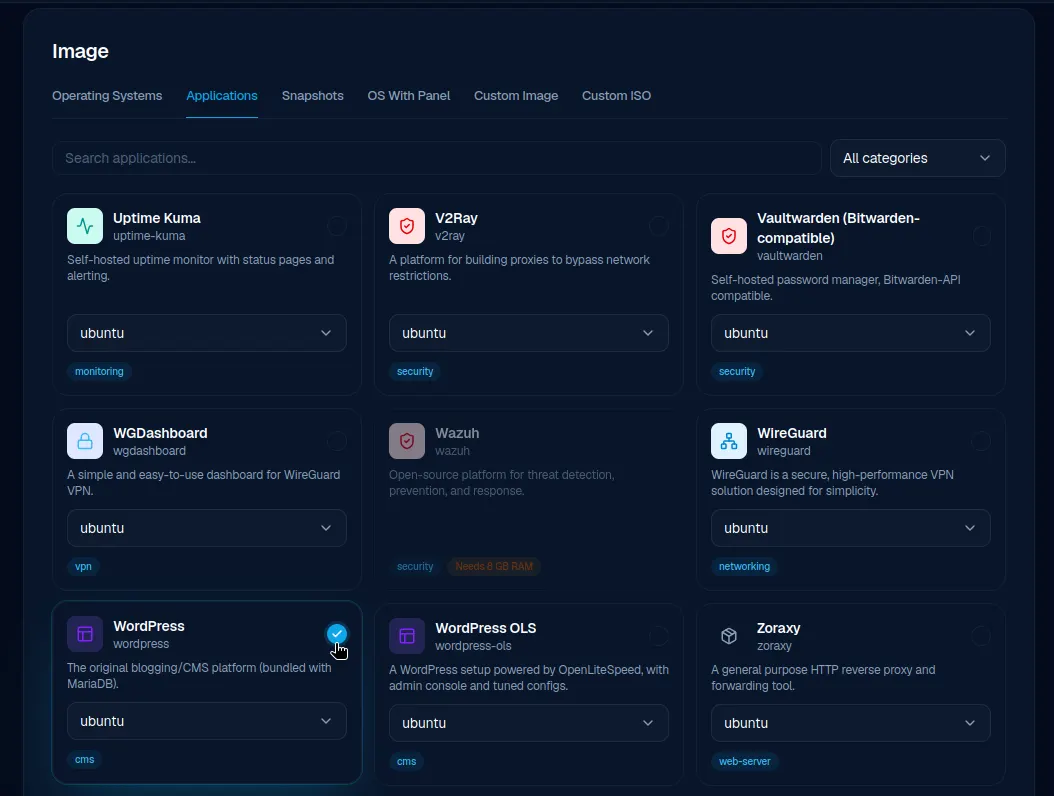
Select the WordPress application when creating a Cloudzy service.
Open the IP address in a browser, complete the WordPress wizard and create the administrator account. You still need to connect the domain, configure valid HTTPS and establish monitoring, updates and recovery.
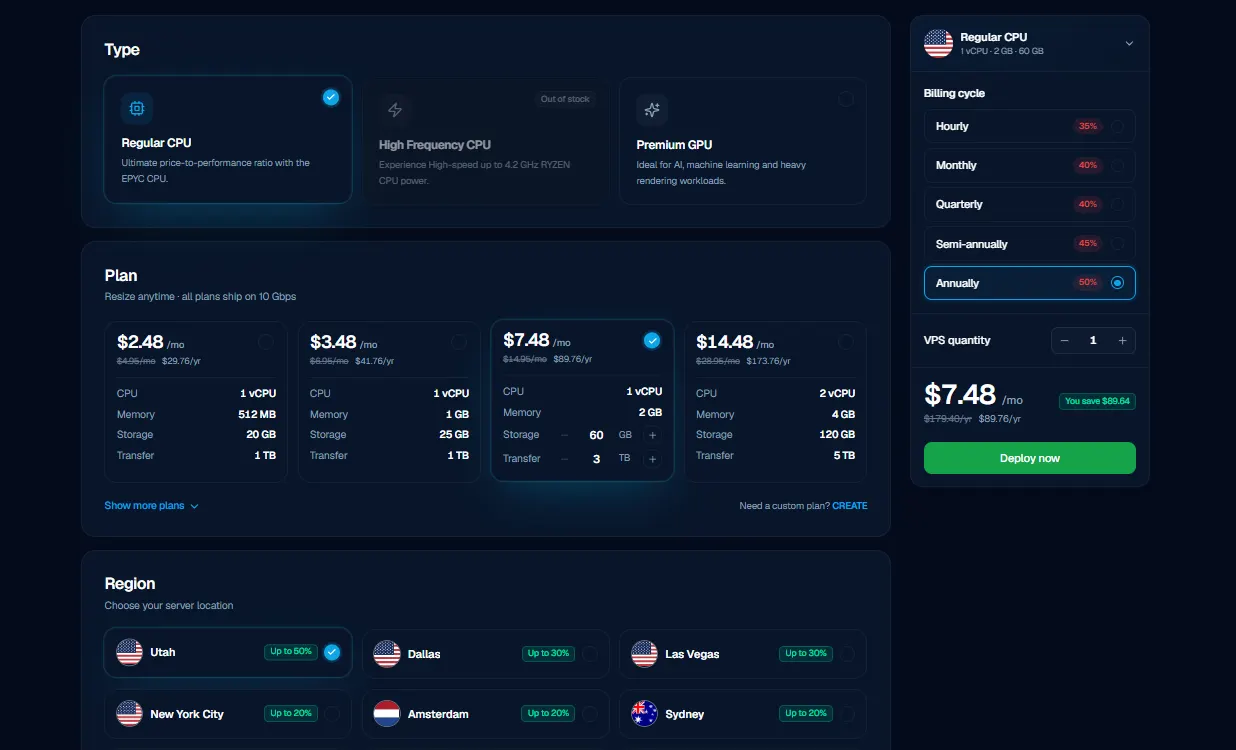
Choose the image, location, resources and billing option before deployment.
Our smallest WordPress plan starts at 2 GB RAM, one dedicated vCPU, 60 GB NVMe and 3 TB transfer at only $7.48/month with free monitoring, plus support for crypto payments.
Root access lets an administrator configure PHP extensions, databases, caching services, WP-CLI, cron and virtual hosts.
For a custom application, that control can mean enabling a required extension or scheduling a background task without waiting for a managed platform to support it. For several client sites, it also means designing isolation and checking their combined resource use. NVMe capacity provides room for files and databases; it does not establish request throughput.
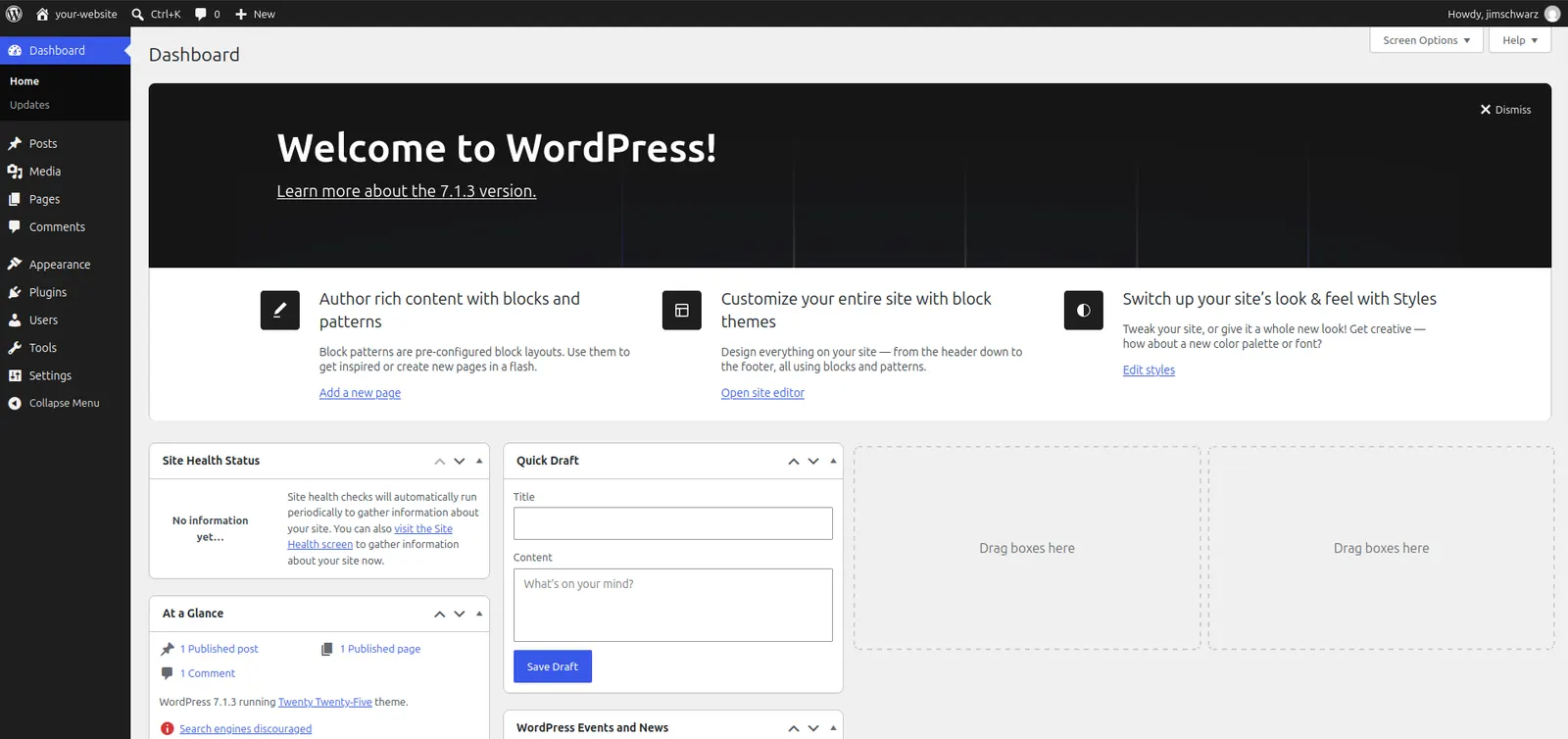
After deployment, complete WordPress setup and configure the site's domain and HTTPS.
The main strengths are installation convenience, configuration freedom, agent readiness and an accessible offer. Our resizing option also comes with downsizing options if needed.
Choose our one-click WordPress VPS if you want to have the freedom to operate and customize the stack yourself. Buyers expecting ongoing WordPress administration should consider managed services.

Launch a faster WordPress VPS with instant deployment.
Get WordPress VPS2. Hetzner, Best for Experienced DIY WordPress Hosting
Hetzner is worth shortlisting when you can administer Linux and its European infrastructure pricing fits your audience. The regular CPX12 provides 2 GB RAM, one shared Intel/AMD vCPU, 40 GB NVMe and 20 TB transfer in the EU reference configuration.
WordPress installation is supported through an application image. The documented stack uses Ubuntu 24.04, Apache, MySQL and PHP extensions. Connect through SSH with root credentials and complete the activation script; Let's Encrypt support helps with HTTPS setup. Hetzner therefore offers installation convenience too, rather than requiring every component to be assembled manually.
The EU CPX12 server costs €14.27/month, excluding VAT and IPv4. Primary IPv4 adds €0.50, bringing this example to €14.77 before backups. Optional daily backups add 20% of the server price, giving approximately €17.72 with IPv4, before VAT and other services.
That resource-and-price combination is attractive for an experienced operator. Root access permits a custom stack, caching configuration and deployment workflow.
The CPX12 example also has less local disk than the Cloudzy and Vultr configurations above. If uploads dominate your storage, assess that trade-off alongside memory rather than choosing by RAM alone.
Daily disk backups provide seven slots and exclude attached volumes. Snapshots are separately billed and remain until removed. Existing powered-off servers remain billable, so stopping a development site does not end its infrastructure cost.
Hetzner has six cloud locations, but product families, transfer allowances and prices vary by region. Treat the CPX12 figures here as an EU example and check ordering availability. A requirement for a particular US location or sustained CPU behavior needs its own plan comparison.
Choose Hetzner when you can use the EU economics and handle operational decisions. Our verdict: strong DIY infrastructure value for that buyer, with location, CPU allocation and recovery checked before purchase.
3. Vultr, Best for Flexible Cloud WordPress Deployment
Vultr suits technical buyers who want choices in compute family and deployment location. Cloud Compute includes Regular, High Frequency and High Performance categories, with deployment from operating-system images, Marketplace applications, ISOs, snapshots or backups.
Its One-Click WordPress application provides a setup flow with root/SSH access and domain/TLS configuration. You finish the site wizard and configure the domain and certificate. The documentation explicitly leaves updates to the customer. Installing WooCommerce is possible, but the installer provides no guarantee of store capacity.
Vultr’s Regular Performance 2 GB/one-vCPU configuration, with 55 GB SSD and 2 TB transfer, has a reference price of $10/month. A 4 GB/two-vCPU option has 80 GB SSD and 3 TB transfer at $20. Our 4 GB/two-vCPU plan, however, has 120 GB NVMe and 5 TB transfer at only $14.48.
The flexibility is useful when a deployment location, compute category or custom image matters to your application. You can compare suitable tiers instead of accepting one WordPress package. That also means doing more selection work: a higher-priced category needs a workload reason, and the cheapest available VM may be the wrong starting point.
Check that your preferred family exists in the target location, then price its resources and recovery together. Multiple deployment methods do not establish that every future change can happen independently or without migration work.
Automatic backups add 20% to instance charges, making the $10 example $12 before tax and other services. They retain the two latest backups, restore whole servers rather than individual files and exclude attached block storage. Copies stay in the original data center on separate storage; consider an independent recovery copy as well.
Bandwidth overage is $0.01/GB, and stopped instances remain billable. Additional services and applicable taxes can increase the total.
Choose Vultr if compute and geographic options solve a specific deployment requirement. Our verdict: a flexible infrastructure choice for operators willing to select and maintain the environment, rather than buyers seeking WordPress-specific administration.
The reference configurations below summarize the plans reviewed above; resource quantities are not performance results.
| Criterion | Cloudzy Regular Dedicated CPU | Hetzner CPX12 EU | Vultr Regular |
|---|---|---|---|
| RAM/vCPU | 2 GB/1 dedicated vCPU | 2 GB/1 shared vCPU | 2 GB/1 shared vCPU |
| Disk | 60 GB NVMe | 40 GB NVMe | 55 GB SSD |
| Transfer | 3 TB | 20 TB | 2 TB |
| Monthly price | $7.48 including WordPress and monitoring | €17.72 including IPv4, excluding VAT | $12 with IPv4 |
| Deployment | One-click app | WordPress image | One-click app |
| Root/management | Yes/customer | Yes/customer | Yes/customer |
| Backups | Arrange; check snapshot fees | Optional +20% | Optional +20% |
| Locations | Multiple regions in different continents | Six; products vary | Tier/location dependent |
| Distinct value | Installer plus control | EU infrastructure value | Deployment choices |
Best Managed WordPress Hosting Alternatives
These services reduce server administration. They are alternatives to purchasing a conventional self-managed VPS with root access, and their prices buy different operational responsibilities.
4. Cloudways, Best for Managed Cloud WordPress Hosting
Cloudways Flexible fits agencies, developers and store owners who want cloud hosting with a management platform. Its pricing page lists DigitalOcean, Vultr, Linode, AWS and Google Cloud options. This review uses Flexible's DigitalOcean Basic Standard Small configuration at $24/month before tax.
The platform supplies WordPress deployment, staging/cloning, Let's Encrypt and stack-management controls. Several applications can share a server subject to capacity. Its “unlimited applications” wording does not remove CPU, memory, storage or bandwidth constraints.
You are paying for tools and managed stack operations that would otherwise require configuration and upkeep. That can be worthwhile when an agency repeatedly deploys sites or needs a consistent staging workflow. Platform caching features help, but Object Cache Pro's inclusion requires 4 GB or above; it is not included with this 2 GB reference.
Flexible offsite backup storage costs $0.033/GB, rounded up in $0.50 increments. The default server-level schedule is daily with one week's retention, backing up application files and databases rather than the entire operating system. Schedule and retention can be adjusted.
The limitation is the platform boundary. Root access is withheld, although supported server settings can be changed. Standard support covers infrastructure/platform issues; expanded plugin/theme troubleshooting and optimization require paid support tiers. Custom code work remains outside scope, and safe update automation is separately offered.
For client sites with unusual dependencies, confirm those requirements fit the supported settings before migrating. Otherwise, the time saved on routine administration could be offset by a customization the platform cannot accommodate.
Choose Cloudways when those tools reduce work your team would otherwise perform. Our verdict: useful managed cloud convenience for teams retaining application responsibility. Compare the selected infrastructure, backup charges and add-ons before deciding whether its operational value justifies the higher bill.
5. Kinsta, Best for Premium Managed WordPress Hosting
Kinsta fits businesses and agencies that want a WordPress operations platform and can accept its limits. Its architecture uses a per-site Linux container and database service. MyKinsta provides site creation and management, with SSH/WP-CLI and standard staging.
This is a WordPress service purchase: compare its site and usage allowances rather than assigning it an equivalent VPS RAM figure. You retain responsibility for accounts, content, plugins and themes, while the platform removes underlying server administration.
The Single 20GB bandwidth plan costs $35 on regular monthly billing before tax. It includes one WordPress installation, 10 GB storage, 20 GB monthly server bandwidth, 125 GB CDN bandwidth and 14-day backup retention. Those are this configuration's limits; another plan's visit allowance or storage figure should not be substituted.
Daily backups and restore points support recovery, and downloadable backups are included. More frequent automatic backups and Kinsta's external-backup add-on cost extra. For a store, restoring yesterday's database can discard subsequent orders, so choose frequency around acceptable data loss.
Tested automatic plugin/theme updates cost $3 per environment/month after a free month. Kinsta's support scope says it does not provide WordPress core updates. Plan who performs and tests those; custom code repair also remains outside support.
SSH is not root, custom Nginx rules go through support, and plugin compatibility restrictions require checking before migration.
For example, a team that regularly stages changes and restores sites may value having those workflows together. A team requiring unrestricted system packages has a different requirement. Make the decision around that operating model, rather than assuming a premium plan removes application ownership.
The premium is worthwhile when the dashboard, staging, recovery tools and WordPress-focused support reduce work for your team. Our verdict: a strong convenience-oriented alternative for buyers who accept platform constraints and have matched the allowances to their sites.
Total hosting cost = infrastructure + add-ons + administration. A lower VPS bill can lose its advantage if you must hire someone to operate it. Conversely, paying for a platform has little value when your team already maintains the required tools efficiently.
How Much RAM and CPU Does WordPress Need on a VPS?
Why Monthly Visitors Alone Don't Determine VPS Requirements
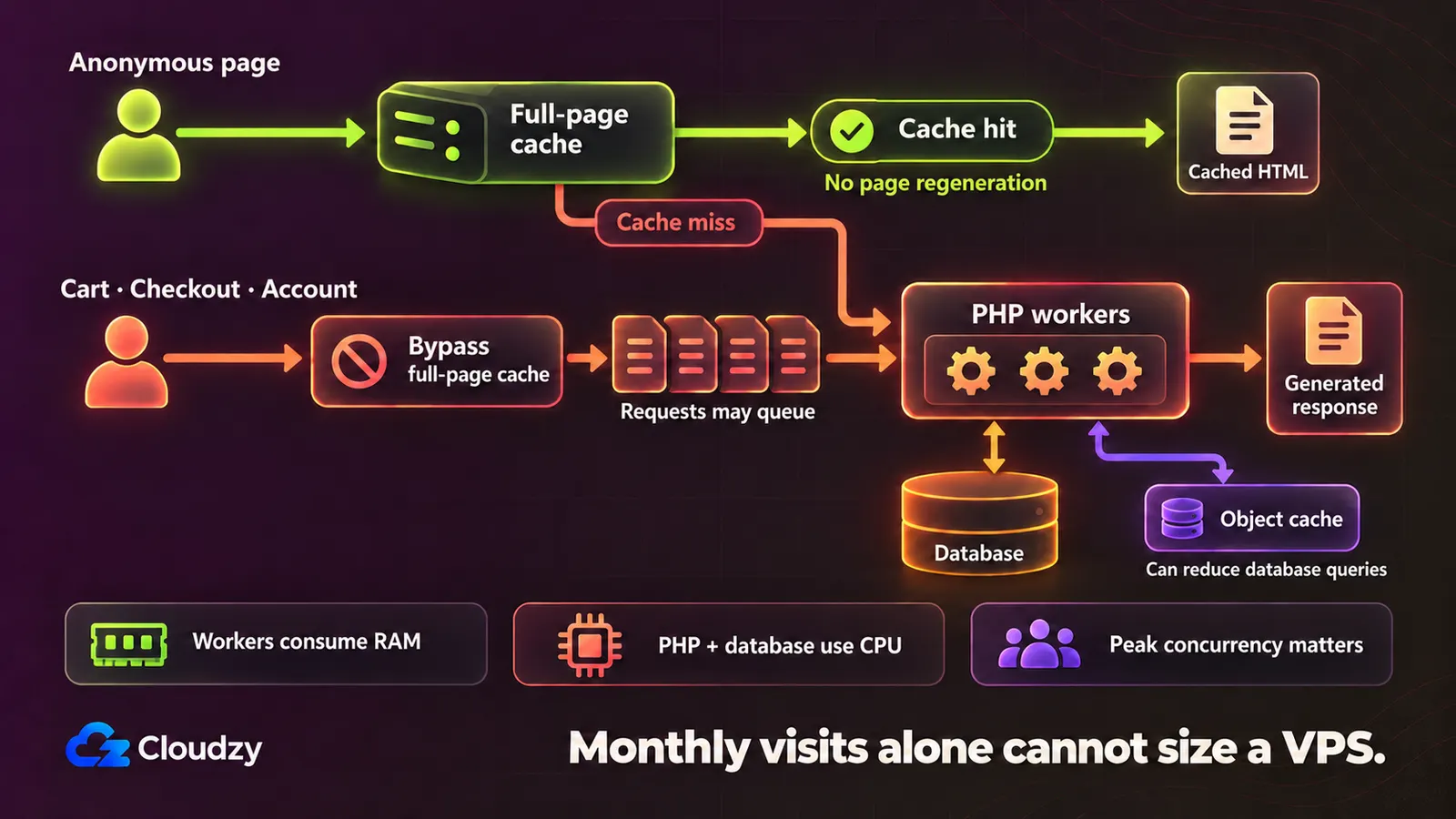
A busy cached blog can require less server work than a smaller store with simultaneous searches, carts and checkouts. That illustrates workload differences; it is not a measured capacity comparison.
Full-page caching can avoid regenerating anonymous pages. Object caching reduces repeated database work, while cart, checkout and account pages need appropriate exclusions. Plugins, imports and database queries also compete for resources.
Concurrency matters because PHP-FPM's worker limit controls simultaneous requests. More workers can consume more memory; increasing the setting creates neither CPU nor RAM. Traffic spikes can expose queues that monthly totals conceal.
The WordPress recommendations include PHP 8.3+, MariaDB 10.11+ or MySQL 8.0+, and HTTPS. WooCommerce recommends a WordPress memory limit of at least 256 MB. That application setting is not enough information to size the whole VPS: the OS, database and concurrent PHP processes need memory too.
VPS Requirements for One WordPress Site vs. Multiple Sites
Each separate installation adds application maintenance, database activity, scheduled tasks and potential resource competition. WP-Cron runs in response to page loads; jobs from several sites can overlap. Different domains alone do not isolate processes or permissions.
WordPress Multisite manages sites within one installation. It differs from several independent installations with separate application lifecycles. Either arrangement still shares the VPS's CPU, memory and storage.
As an editorial starting point, a small, mostly cached single site might test 2 GB RAM/one vCPU. A 4 GB/two-vCPU configuration offers more headroom for plugins or dynamic activity. Neither is a guarantee that a store or collection of sites will fit, and these suggestions are not measured visitor thresholds.
Validate with representative activity: check memory pressure, sustained CPU use, response times, worker queues and database behavior. Include administrative jobs and likely peaks. Change resources or configuration in response to the bottleneck rather than buying RAM solely because traffic increased.
Keep storage growth in the plan too: media, logs and database size can force a change even when CPU and memory remain comfortable.
Use the estimator to calculate recommended CPU, RAM, and storage for your sites. Cacheability, simultaneous activity and the number of installations matter alongside traffic.
WordPress VPS Sizing Estimator
Calculate CPU, RAM, and disk for your WordPress sites. All traffic and storage inputs cover every site on this VPS.
The estimate is a starting point, not guaranteed capacity. Check resource use and response times with your actual themes, plugins and peak activity.
What to Look for in a VPS Provider for WordPress
CPU, RAM, and Storage
Check whether CPU allocation is shared and what the chosen family promises. Hetzner's cost-optimized option explicitly allows variable CPU performance; equal vCPU counts do not make it equivalent to another tier. RAM must serve all processes, while disk capacity must accommodate uploads, database growth, logs and temporary files. NVMe provides useful context, but the label alone does not establish database performance. Identify the resource your workload actually exhausts before upgrading.
WordPress Installation and Server Management
All three self-managed providers offer installation assistance. Compare what happens afterward: supported software, credential delivery, HTTPS setup and access for troubleshooting. Confirm root/SSH and whether you need WP-CLI or a Linux control panel. Price a panel license where required. Cloudways and Kinsta provide different management interfaces with restricted server access, so check any essential customization before moving a working site. A convenient first installation cannot settle the long-term management choice.
Backups, Security, and Support
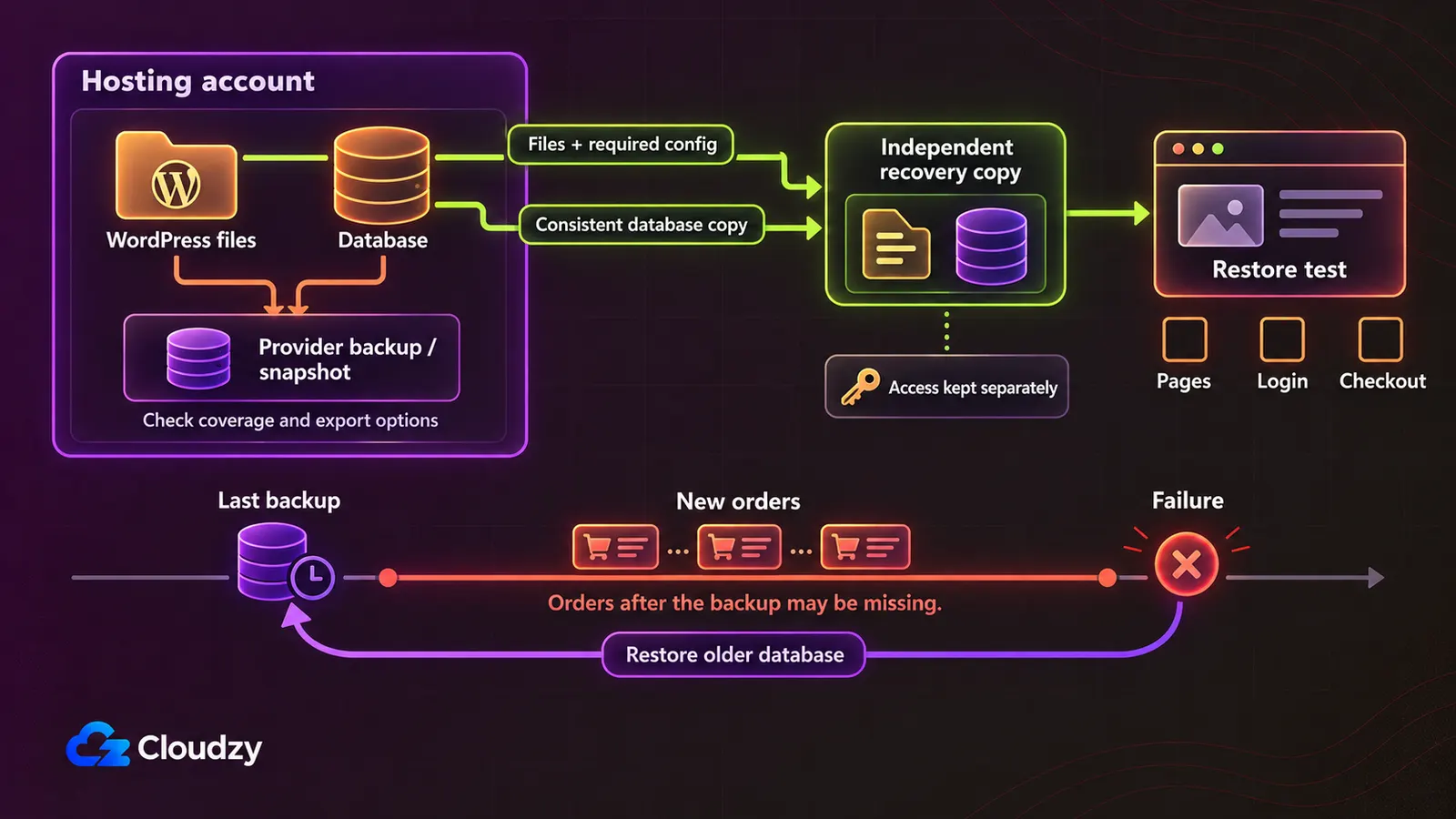
A recovery plan needs both WordPress files and database, a suitable schedule and a tested restore. Check whether backups include attached storage and whether copies can survive a provider/account problem. Hetzner and Vultr exclude attached storage from the reviewed disk-backup products. For stores, decide how many recent orders you can afford to lose. Assign OS patching and application security separately, and ask what support actually troubleshoots.
Total Cost and Scalability
Compare the bill after promotions with the services you intend to enable: backups, panel licenses, extra storage, transfer and administration. Read billing terms before committing to a longer cycle. Our resize option calculates your new server billing on the spot, while stopped Hetzner and Vultr instances still incur charges. Plan upgrades around possible migration, recovery and interruption work. Managed platforms deserve the same scrutiny: backup storage, update automation, support tiers and usage limits can change the total.
Before paying, write down the configuration, recurring costs and upgrade route you selected. That makes later comparisons useful when a promotion ends or your workload changes.
How We Selected These WordPress VPS Hosting Providers
Our Evaluation Criteria
We reviewed public plans and product documentation on October 2026, focusing on questions a WordPress buyer must resolve before ordering:
- WordPress suitability: installation methods, software compatibility and application capabilities.
- Resources: relevant CPU, memory, storage and plan availability.
- Management: who operates the server and application.
- Pricing: a suitable reference plan, billing conditions and extras.
- Operations: backups, caching, staging and multiple-site workflows.
- Control: root access and configuration restrictions.
- Buyer fit: which requirements make each option useful.
- Limitations: restrictions that could change the purchase decision.
Reference plans illustrate buying choices; they do not establish equal capacity across infrastructure and managed services. Recommendations such as Hetzner for experienced EU operators are editorial judgments drawn from these documented differences.
Which WordPress VPS Hosting Provider Should You Choose?
Start with responsibility, then narrow the infrastructure or platform:
- Choose our Cloudzy WordPress VPS if you can manage the server and want straightforward WordPress deployment with root control. Our price-to-performance value beats that of every other provider in this comparison.
- Choose Hetzner if you are technically experienced and its EU infrastructure value fits. Confirm the location, CPU family and availability.
- Choose Vultr if compute-tier or location choices solve a deployment requirement. Compare the complete selected configuration.
- Choose Cloudways if you want managed cloud tools with less infrastructure work and can retain responsibility for the application.
- Choose Kinsta if WordPress operations matter more than direct server customization and the site/usage allowances fit.
For any option, define who handles incidents and validate workload fit using methods the provider permits before treating a reference plan as sufficient. Kinsta prohibits load testing; discuss suitable capacity checks with its support team.
Run WordPress on a VPS you control
Deploy through our one-click application, configure your hosting environment with root access, and choose resources to test against your workload. For buyers who want freedom and are prepared to operate their own stack, make sure to check our WordPress VPS.
Frequently Asked Questions
Do I need Linux experience to host WordPress on a VPS?
Someone does for a self-managed setup. A one-click image helps installation, while patching, recovery and troubleshooting remain operational work. If neither you nor your developer will do that, compare managed services and verify what their support covers.
Can I host multiple WordPress websites on one VPS?
Yes, with adequate resources and proper configuration of permissions, the web server and databases. Separate installations share server capacity; Multisite manages several sites within one WordPress installation. There is no universal safe site count, so assess the combined activity and maintenance workload.
Is a managed VPS the same as managed WordPress hosting?
The scopes differ. Managed VPS contracts cover specified server tasks; managed WordPress platforms add application-oriented tools and restrictions. Check who handles updates, backups and plugin problems. Neither label alone means the provider repairs custom code or takes over every maintenance task.
Is 2 GB or 4 GB RAM enough for WordPress?
Either can be a starting configuration to test. Cacheability, concurrent requests, plugins and other services determine whether it fits. Use the sizing guidance, then measure real activity; monthly visitor numbers alone cannot establish the required RAM or CPU.
Is a VPS suitable for WooCommerce?
Yes, provided capacity, administration and recovery suit the store. Cart and checkout activity needs dynamic processing, even when product pages are cached. Test representative concurrent activity and choose backup frequency around acceptable order loss, rather than assuming a small store is automatically lightweight.
Can I migrate an existing WordPress site to a VPS?
Back up files and database, configure the destination and test URLs, HTTPS, logins, checkout and email. Plan final data synchronization before changing DNS, especially for active stores. Keep a rollback option until the new setup is verified; included migration assistance varies by provider.



Discussion
Comments
Sign in to join the discussion.