

A feed can look right in a desktop browser and still leave questions about phone reading or fetching full articles. The best self-hosted RSS readers fit the way you read and the software you are willing to maintain. Choose a reading workflow first, then check the database, client support and refresh requirements before committing your subscriptions.
The readers below are ordered by their GitHub star counts.
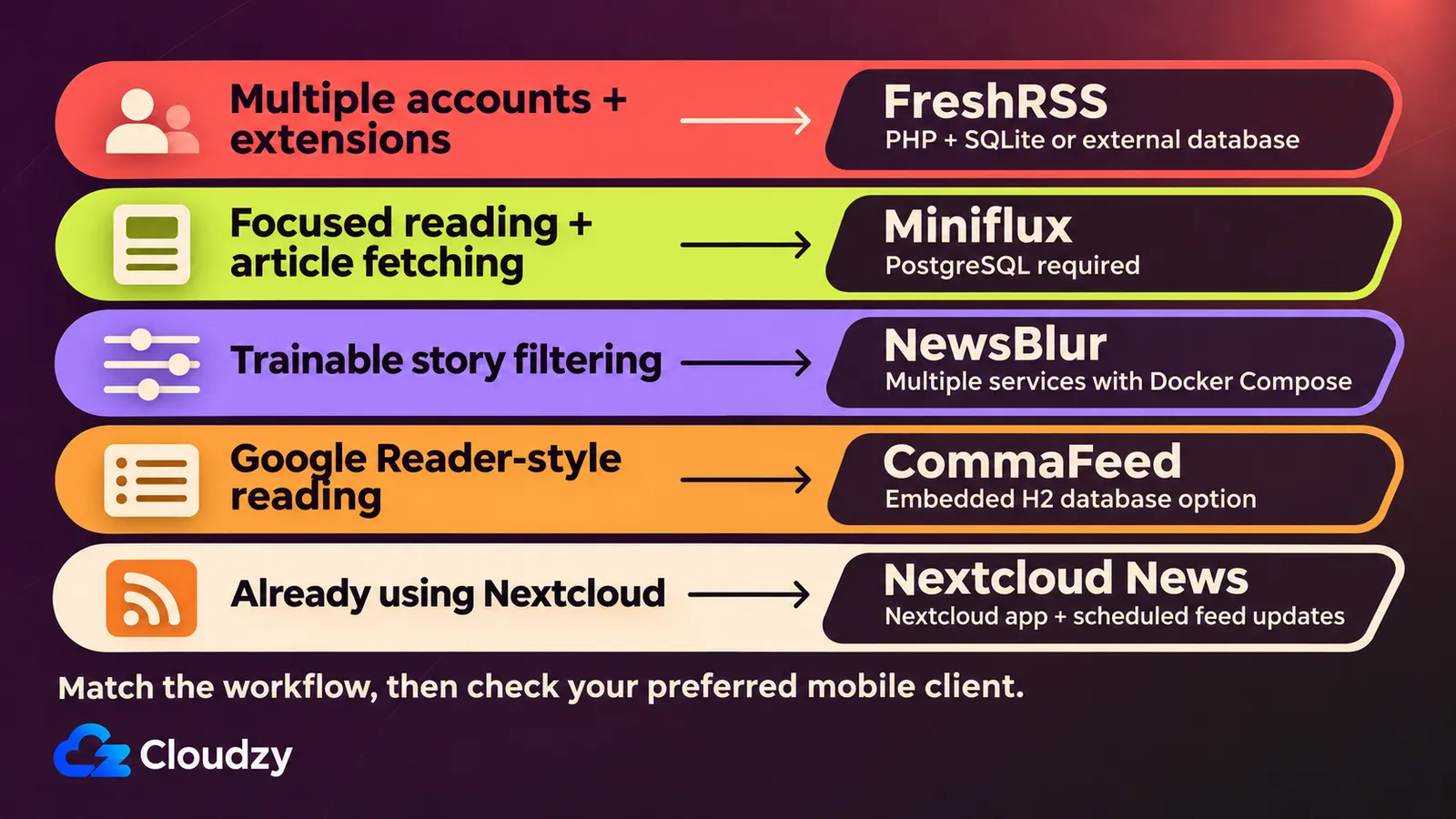
FreshRSS for Multiple Accounts and Extensions
FreshRSS combines separate reading accounts with extensions, as its project README documents. FreshRSS ranks first in this shortlist by GitHub stars. This is the best self-hosted RSS reader for running multiple reading accounts with extensions. That combination fits a shared installation where people want their own reading lists and you want room to customize the application.
Treat extension support as a reason to identify the changes you need. Multiple accounts alone do not make FreshRSS unique.
The installation requirements specify a web server, PHP 8.2+ and a supported database: SQLite, PostgreSQL, MariaDB or MySQL. SQLite avoids operating a separate database service; the other choices can fit an existing database setup. This is an operating choice, not a performance ranking.
Before installing, choose the database you can maintain and follow the README's installation path for that choice. Include the required PHP extensions in that check.
For a VPS installation, our FreshRSS one-click app provides a starting point, with instructions for Compose management and domain HTTPS setup.
Miniflux for Focused Web Reading
Miniflux's README describes a reading-focused web interface and original-article fetching. Miniflux ranks second in this shortlist by GitHub stars. This is the best self-hosted RSS reader for focused web reading with original-article fetching. It suits a reading list where opening and reading the article is the main task, with less emphasis on extending the application.
The documented OPML import/export gives you a route to bring subscriptions over. For truncated feeds, Miniflux can fetch the original page. Its scraper-rule documentation also describes custom CSS selectors saved per feed. Those controls are useful when an individual source needs attention; you do not have to choose one extraction rule for your entire reading list.
The server dependency remains explicit: Miniflux works only with PostgreSQL. A statically compiled application binary does not remove that database service. Official Debian/RPM packages, binaries and container images provide acquisition choices. Choose the packaging that fits your server, then include PostgreSQL in the installation and maintenance plan.
To start on a VPS, our Miniflux one-click app provides a preconfigured installation, with instructions for managing the stack and setting up domain HTTPS.
NewsBlur for Trainable Story Filtering
NewsBlur lets you train likes and dislikes so it can highlight or hide stories, according to its project README. NewsBlur ranks third in this shortlist by GitHub stars. This is the best self-hosted RSS reader for training filters to highlight relevant stories. Choose it when selecting what deserves attention is a substantial part of reading a busy feed list.
The classifier dimensions include author, tag, title and feed. For example, you could evaluate whether author preferences help with a publication that mixes useful reporting with sections you skip. That is a trial to perform with your subscriptions, not a promise that the initial results will match your preferences.
NewsBlur's documented stack includes PostgreSQL, MongoDB and Redis, with Celery for background tasks and Node.js services for extraction and image processing. Elasticsearch is optional. Its self-hosting quick start uses Docker Compose; there are several services to maintain behind the reader.
Review that Compose setup before choosing NewsBlur for filtering alone. Identify which services store your data and how you would restore them together after a failed update.
CommaFeed for a Google Reader-Style Workflow
CommaFeed's README describes a Google Reader-inspired web reader with an embedded H2 database option. CommaFeed ranks fourth in this shortlist by GitHub stars. This is the best self-hosted RSS reader for a Google Reader-style workflow without a separate database server. The attraction is a familiar reading layout paired with storage inside the application setup.
Embedded means H2 runs with the application instead of requiring a separately operated database service. CommaFeed's database instructions place its database file in the working directory's data directory. Preserve that directory across replacements and updates. PostgreSQL, MySQL and MariaDB are also supported if you prefer an existing database service.
The installation routes differ. Native packages run as executables; the JVM package requires a Java Runtime Environment. Docker is another documented route. Pick a package for both your operating system and database choice.
Keyboard shortcuts are worth trying with a normal reading session. They give you a concrete way to judge whether this interface fits how you move through feeds.
Our CommaFeed one-click app provides a VPS installation with setup instructions, persistent data storage and commands for managing the service.
Nextcloud News for an Existing Nextcloud Setup
Nextcloud News is an RSS/Atom app installed inside Nextcloud, as its repository README explains. Nextcloud News ranks fifth in this shortlist by GitHub stars. This is the best self-hosted RSS reader for adding feeds to an existing Nextcloud installation. Its practical advantage is reusing a platform you already operate, with feed reading available alongside that existing setup.
Installing the whole Nextcloud platform solely for RSS would add a different maintenance commitment. Our Nextcloud installation guide for Ubuntu and Debian shows what the setup involves. Start here when Nextcloud is already useful to you. Install News through Nextcloud's integrated app store, then check the selected release against your Nextcloud and PHP versions. The release's dependency manifest records those compatibility limits.
Feed refresh needs a separate check. The News troubleshooting documentation requires Nextcloud system cron or an external updater through the API. Webcron and AJAX modes do not update News feeds. Scheduled refresh is the background job that retrieves new items, even when you are not reading.
After installation, inspect the News administration page for the last update-job execution. A working page and an imported subscription list are not enough to establish that new articles will arrive.
If you also want Nextcloud’s broader tools, our Nextcloud one-click app provides a starting point on a VPS. Install News separately through Nextcloud’s app store, checking release compatibility and configuring feed refresh as described above.
Check the Reading Workflow Before Switching
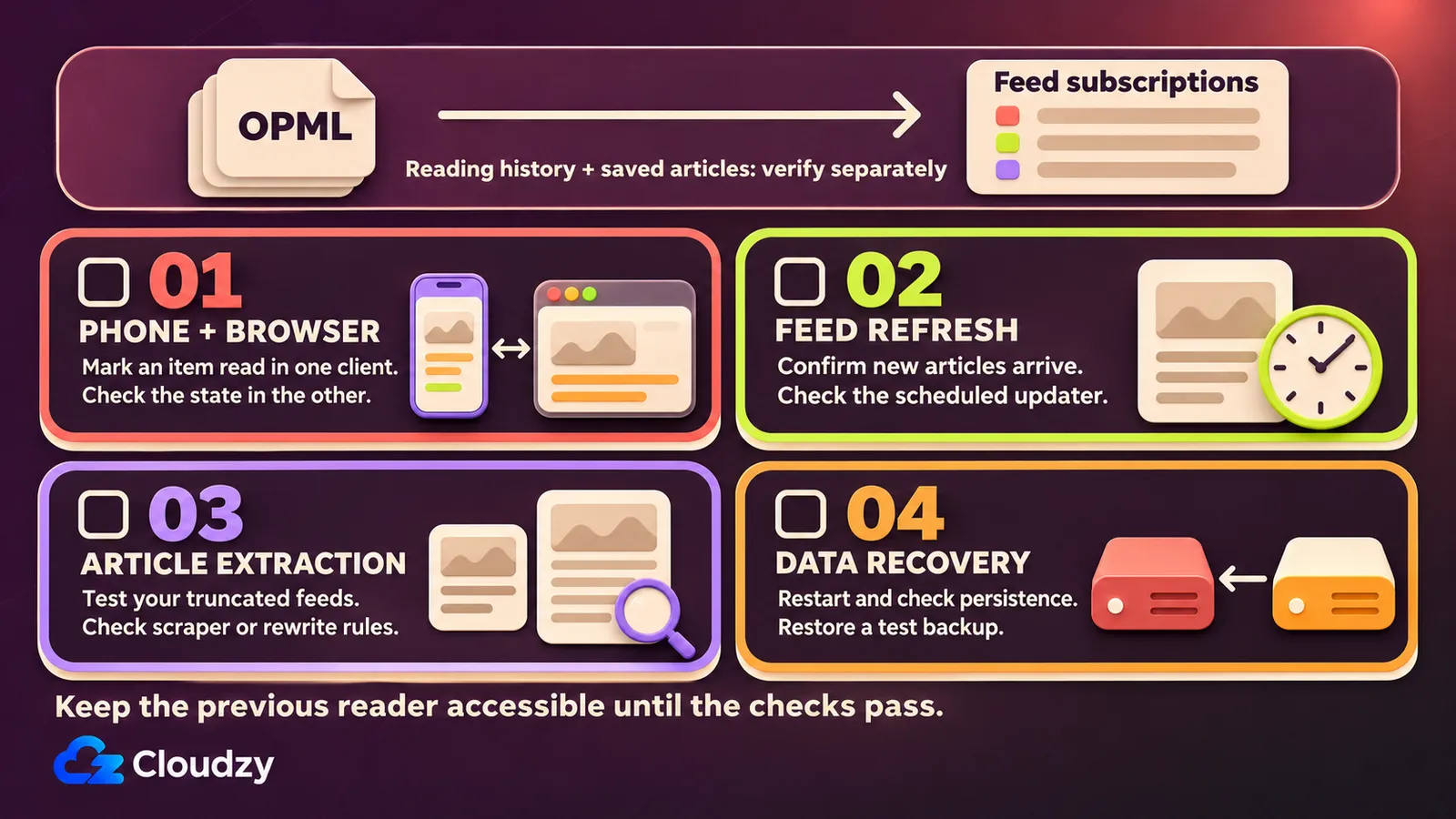
Import a representative set of subscriptions into your chosen reader. Open articles on your phone and in your browser, then mark items read and check the result in the other client. Verify that new items arrive and that data survives a restart before retiring the previous setup.
Reuse a suitable home server, NAS or existing platform if it supports the chosen stack. A VPS fits when you want a separately reachable server without relying on home hardware. PHP-capable web hosting can suit FreshRSS when it provides the required PHP extensions, database and refresh scheduling.
A device-only reader may suffice without shared server state. If server administration is the obstacle, hosted Miniflux manages it for you. The SaaS versus self-hosting choice includes deciding who handles updates and recovery, not only where the application runs.
Confirm scheduled refresh and persistent database or data directories. Make a backup and write down how to restore it. For remote access, point a domain to your VPS if you use one, and configure HTTPS before making it your everyday reader.
Frequently Asked Questions
Do I Need a Separate Phone App to Read My Feeds?
No. Miniflux documents a responsive web interface for phone and desktop reading. A native client instead connects through a supported API, the interface applications use to exchange data. FreshRSS's client compatibility matrix distinguishes client capabilities; support for an API does not establish that every client synchronizes every function.
Why Does Full-Article Fetching Miss Some Content?
A feed's supplied text and the original webpage are different inputs. Miniflux's README documents Readability extraction; its URL rewrite rules address cases such as a page returning a consent dialog. Check affected sites and their scraper or rewrite settings. One setting cannot guarantee complete extraction from every site.
Will OPML Move My Reading History and Saved Articles?
OPML is a subscription-list exchange file. Miniflux's documented OPML import and export does not establish transfer of reading history, saved articles or account settings. Check the target reader's actual import behavior for the data you need, and keep the previous reader accessible until you have accounted for it.

Discussion
Comments
Sign in to join the discussion.