

The last time I lost an overnight agent run, nothing crashed. Nothing errored. I'd kicked off a long migration on a repo I'd been avoiding for months, watched it grind through the boring early part, and then closed the laptop because I was done for the night. Opened it again the next morning in a coffee shop. The session was gone. Not failed. Stopped, somewhere in the middle, with a half-finished branch and no record of what it had been about to do next.
And I'd already run the fix. That's the part that got me.
So this is about why that fix was never going to work, and about the extremely boring rented box that does the job instead. It's what I use to run AI agents 24/7 now, and I have stopped thinking about my laptop's power settings entirely.
The Fix Everyone Recommends
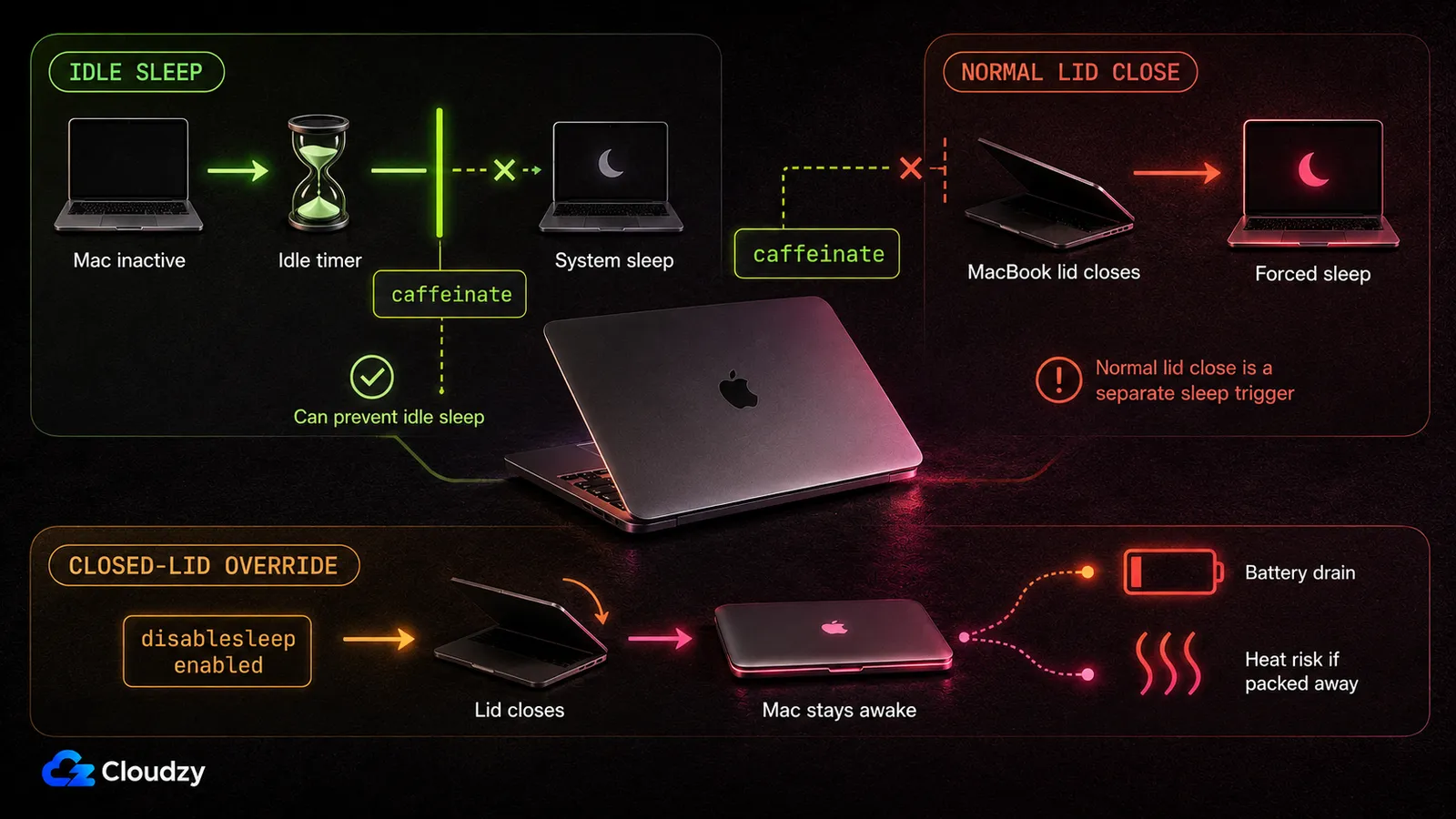
caffeinate -dimsu. Or a menu-bar app with a coffee cup icon. Or, if you went digging, sudo pmset -a disablesleep 1, which is the nuclear option and the one that turns up in the most confident-sounding advice. I ran that one. It felt like solving the problem.
macOS has more than one way to fall asleep, and the two that matter here are independent of each other: idle sleep is a timer that runs down when nothing is happening, while closing the lid normally triggers forced sleep through a separate path. What caffeinate creates is a set of power assertions, and ss64's caffeinate reference shows its flags covering display sleep, idle sleep, disk idle sleep, and system sleep. Apple's power-management documentation makes the important distinction: an idle-sleep assertion still doesn't override a normal lid close, the Apple menu, or low battery.
So keep-awake tools do work on the sleep conditions they were built to control. But a normal lid close is a different problem, and caffeinate isn't a closed-lid server strategy.
Note
disablesleep is the strange one. It doesn't appear in the standard pmset option reference at all. The fix people reach for is an undocumented setting. It isn't a power assertion. It can keep a MacBook awake with the lid closed, including on battery, until you turn it back off or the battery runs out.
A Laptop Is the Wrong Shape for a 24/7 Job
There was a stretch in the nineties where people ran production web servers off desktop towers under somebody's desk, and everyone in the building learned not to kick the power strip. We didn't fix that with a sign on the power strip. We fixed it by moving the workload onto a machine whose entire job was to sit still and stay powered.
Same shape of problem, thirty years later. A MacBook is a machine designed around being closed and carried away. That is not a bug in its power management. It is the product. Every keep-awake fix is an argument with a design decision somebody made on purpose, and you can win that argument for a while, at the cost of thinking about it forever.
You can go further and disable sleep outright. Congratulations: you now own a permanently-running server with a battery in it, plus a system-wide setting you have to remember to undo before the laptop goes in a bag. The first rushed pack-up doesn't stop the run. It leaves the machine awake, draining battery and building heat where you really don't want it.
None of this is new, either. Self-hosted agent daemons hit the same wall for the same reason: they need to be up when you're not at your desk, which rules the laptop out before you've configured anything. That's been true of the category for a while. It just hadn't cost me a night's work yet.
Your Agent Isn't Thinking on That Box
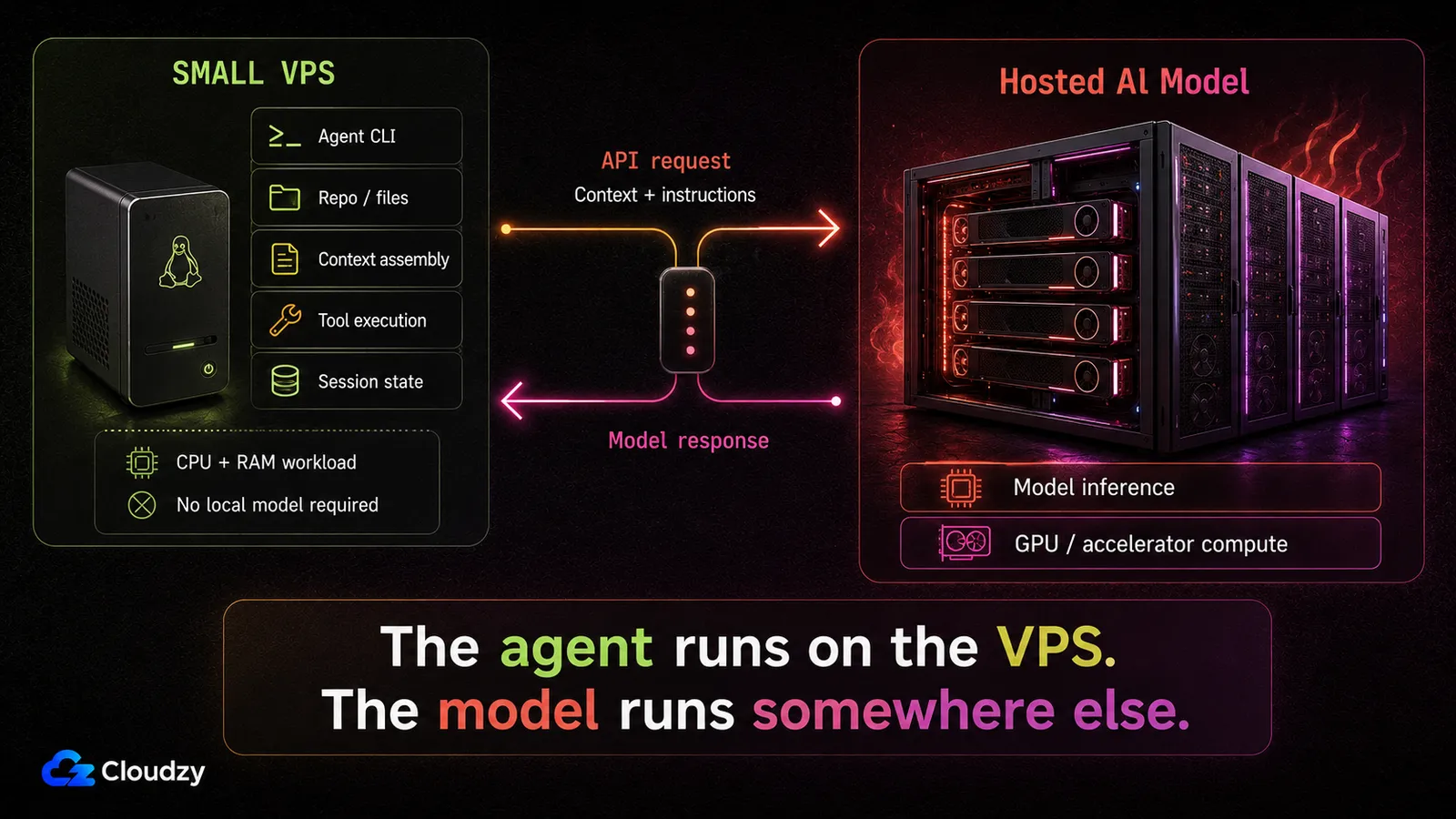
Claude Code's own system requirements ask for 4 GB or more of RAM and an x64 or ARM64 processor. That's the hardware line, in full. No GPU line. No VRAM line. Nothing about a model at all, because there isn't one on your machine.
This took me embarrassingly long to internalize, and it's why the price stops sounding suspicious. The agent process on your box is doing three jobs: assembling context and shipping it out as API calls, holding conversation state between turns, and running whatever tools the model asks for. That is coordination work. (I kept looking for the GPU in this story. There is no GPU in this story.) The expensive part, the part that wants a rack of accelerators, is happening in somebody else's data center.
The agent isn't thinking on that box. It's placing calls to something that is.
Which is why a machine that can do this costs what it costs. As of late August 2026, DigitalOcean's cheapest Basic Droplet is $4 a month for 512 MiB and one vCPU, and Vultr's Cloud Compute ladder starts at $2.50 for a 512 MB IPv6-only instance and reaches $5 at 1 GB. Two vendors, same shape of floor. Both bottom rungs sit under the 4 GB in that requirements line, and the $5-class plans do too. If you're running Claude Code specifically, 4 GB is the published floor. The cheap end only works when the agent you're actually running has lower requirements.
One boundary, because getting this wrong costs money: this holds for agents that call a hosted model. If what you want is a model running locally on hardware you own, none of it applies. A box with a gigabyte of RAM is not running a model you'd want to code against.
The box is cheap because the expensive part is happening somewhere else.
What a Mac Mini Costs, and What It Buys
A Mac mini costs $899 now, and you can't have one until September 22. The base M6 configuration (12-core CPU, 12-core GPU, 16GB memory, 256GB storage) is on pre-order, shipping that day; TechCrunch's launch writeup has the number. Apple lists nothing under it.
That number's worth sitting with. Same 16GB, same 256GB: that memory-and-storage configuration launched at $599 in October 2024. Half again as much for the base Mac mini, inside two years. There was a $799 step in between, when Apple stopped selling the 256GB configuration in May 2026 and the starting price moved up with it. That's the ground the buy-it-outright argument is standing on, and it keeps moving.
The other side has more going for it than I'd like. It's yours outright, with resale value and no monthly line item. Electricity barely registers at idle: Apple publishes 4W at idle for the M4 configuration, which works out to about $6.40 a year at the June 2026 U.S. residential average electricity price. Real workloads draw more, so I wouldn't pretend 4W is the operating number. And rented compute is only cheap at the bottom of the ladder. The same DigitalOcean list that opens at $4 tops out at $96 a month for a 16 GB box, and three years of that costs several times what the Mac mini does.
So yes. If the question is what a given amount of compute costs to own versus rent over three years, buy the Mac mini. That question has an answer and it isn't the one I'm arguing for.
Two things a Mac mini buys that change the equation. The first is macOS itself: an agent running there can be wired into Notes, Messages, Shortcuts, Calendar, and Reminders through macOS automation and app permissions. A headless Linux box does not have those local apps. If your agent's job is to work with them, the Mac mini is the right machine and I won't pretend otherwise.
The second is local inference, where a lot of fast memory next to a fast chip is genuinely strong value and no cheap VPS competes. Commenters in a Hacker News thread on exactly this make that case well and I think they're right. Different question from mine, though.
Neither of those is a fix for a laptop that closes. Buying a desktop to stop a laptop from sleeping is buying hardware to solve a topology problem.
What Changed After I Moved It
I forgot it existed for a couple of weeks. That's the review.
I started it, moved the agent on, checked a few times because I didn't trust it yet, then stopped checking. Runs finish. The lid has nothing to do with anything. My Mac sleeps now, which is what I want a laptop to do.
The friction is real, so here it is. I lost the local machine: anything the agent did by touching my own desktop, it can't do now, which broke two small workflows I'd built without thinking about them. There's a server now, with SSH on it and a firewall in front of it and a distribution that wants updates, which is a small permanent tax on my attention. Anyone telling you a rented box is zero-maintenance is skipping a step. And it's cheap because inference is remote: the day I want something running locally on it, the cheap tier stops being the number.
An agent started directly inside an SSH shell can die when that connection drops. Start it inside a persistent session first. tmux is the standard answer, and keeping sessions alive on a remote box has the specifics.
Then the sharpest objection anyone makes to this: isn't a rented machine a worse home for an agent than hardware you physically own? For an operator-style agent with access to your personal files, fair. For a coding agent, a VPS you control with root access and a firewall you configured is a different risk profile from an agent service you expose broadly to the public internet. It is still a virtual machine on somebody else's hardware, and anything you leave reachable from the internet is still part of your attack surface. And the part that leaves your control, the API call carrying your code off to a model provider, leaves either way. Mac or Linux, that trust boundary is the same.
What I wanted was a machine I could stop caring about. Boot it, harden it, put the agent on it, forget it. If you're setting one up, a plain Linux VPS is all this workload asks for, and ours hands you root over SSH a minute after you pick a region and a distro. Roughly the ceremony this deserves.

Build on a Linux VPS with root access, NVMe, and AMD EPYC power.
View Linux PlansWhat I'd Tell Someone Starting Today
Three things, then I'm done.
What I run now: one small rented Linux box, a gigabyte or two of RAM, a single vCPU, NVMe storage, in a region near me. That's what my workload needs; if your agent publishes a higher floor, use that instead. On it, the agent CLI, tmux, a firewall, unattended updates. It gets about as much of my attention as my router does.
The advice, such as it is: put the agent on the cheapest box that meets its published requirements before you buy anything. Not as a permanent decision. As a test. Inside a week you'll know whether your workload is API orchestration, in which case you're finished and you just kept $899, or whether it genuinely needs hardware of its own.
The one thing I would not do again: spend weeks tuning power management. I tried caffeinate, then a menu-bar app, then disablesleep, then a scheduled wake, and treated every failure as a configuration bug I hadn't found yet. It wasn't. The tell was sitting right there: each fix made the machine slightly worse at being a laptop. Losing a night of work was an expensive way to notice.
Frequently Asked Questions
Does Caffeinate Keep a Mac Awake When the Lid Is Closed?
No. caffeinate uses power assertions to hold off sleep conditions such as idle sleep and display sleep. Apple's own documentation for that assertion says the system may still sleep for lid close, the Apple menu, or low battery. A normal lid close triggers forced sleep, which those power assertions don't prevent, which is why keep-awake tools work reliably right up until the lid closes.
How Much RAM Does an AI Coding Agent Need on a Server?
Less than most people expect, because the model isn't running on it. Claude Code's published system requirements ask for 4 GB or more of RAM and an x64 or ARM64 processor, with no GPU requirement, since inference happens on the model provider's hardware. The floor is set by the agent's own tooling (your checkout, your build steps, your language runtime), not by the model.
Is a Mac Mini Cheaper Than Renting a Server Over Three Years?
It depends how much machine you need. At the bottom of the rental market, three years of a small box costs a fraction of a Mac mini, which now starts at $899 for the base M6 configuration, shipping September 22. Move up the ladder and owned hardware wins, because the purchase price stops and the monthly bill doesn't. Either way that answers a cost question, not the question of where a portable machine's always-on workload should live.
What Keeps an Agent Session Running After I Disconnect From the Server?
A terminal multiplexer. Start the agent inside a tmux (or screen) session on the server and detach; it keeps running after your SSH connection drops, and you reattach later from anywhere. Without one, closing your terminal can kill a process attached directly to that shell, reproducing on a server the exact problem you left the laptop to escape.

Discussion
Comments
Sign in to join the discussion.