

MT5 VPS Hosting
One-Click MT5 VPS Hosting
One click, then RDP in. Run MetaTrader 5 on a dedicated MT5 VPS with static IPs, NVMe, and up to 40 Gbps links. Scale hourly.

 Trustpilot
There’s a reason 117,000+ developers & businesses choose us.







Money-Back Guarantee

Online Support

Network Speed

Network Uptime
What Is MT5 VPS?
MetaTrader 5 is a desktop trading platform for forex and other markets, known for charts, technical indicators, and automation via Expert Advisors and MQL5 tools.
Cloudzy’s One-Click MT5 VPS runs it on Windows Server and keeps it online 24/7. You get dedicated EPYC vCPUs, DDR5 RAM, pure NVMe, static IPv4/IPv6, snapshots, hourly billing, up to 40 Gbps networking, and a 99.99% uptime SLA. RDP logins are hardened, and admin access stays open, so you can add indicators, DLLs, or multiple terminals as your workflow changes.
-
DDoS Protection

-
Various Payment Methods Available
-
Pre-Installed OS of Your Choice
-
Full Admin Access
-
Latency-Free Connectivity


Why Choose Cloudzy’s MT5 VPS Hosting
Unlock the Power of Flexibility and Performance
Preinstalled, One-Click MT5
Choose a one-click image with MetaTrader 5 preinstalled on Windows Server. Log in over RDP, add your broker account, then import EAs and indicators.

Dedicated resources for trading hours
EPYC vCPUs, DDR5 RAM, and pure NVMe storage reduce noisy-neighbor slowdowns, so chart refresh, tick logs, and order routing stay consistent under load on your VPS for MT5.
Network headroom and stable allowlists
Get a dedicated IPv4 and IPv6 pair, plus up to 40 Gbps uplinks. Broker IP allowlists stay steady, and latency checks help pick the closest region.
Snapshots for safer changes
Take a snapshot before EA updates, DLL installs, or Windows tweaks. If results drift, roll back fast and keep the same environment for your next run.
Flexible billing and real support
Pay hourly or monthly, resize with a reboot, and scale down after busy weeks. Support is available 24/7, with a 99.99% uptime SLA for core networking.
How to Set Up Cloudzy’s MT5 VPS
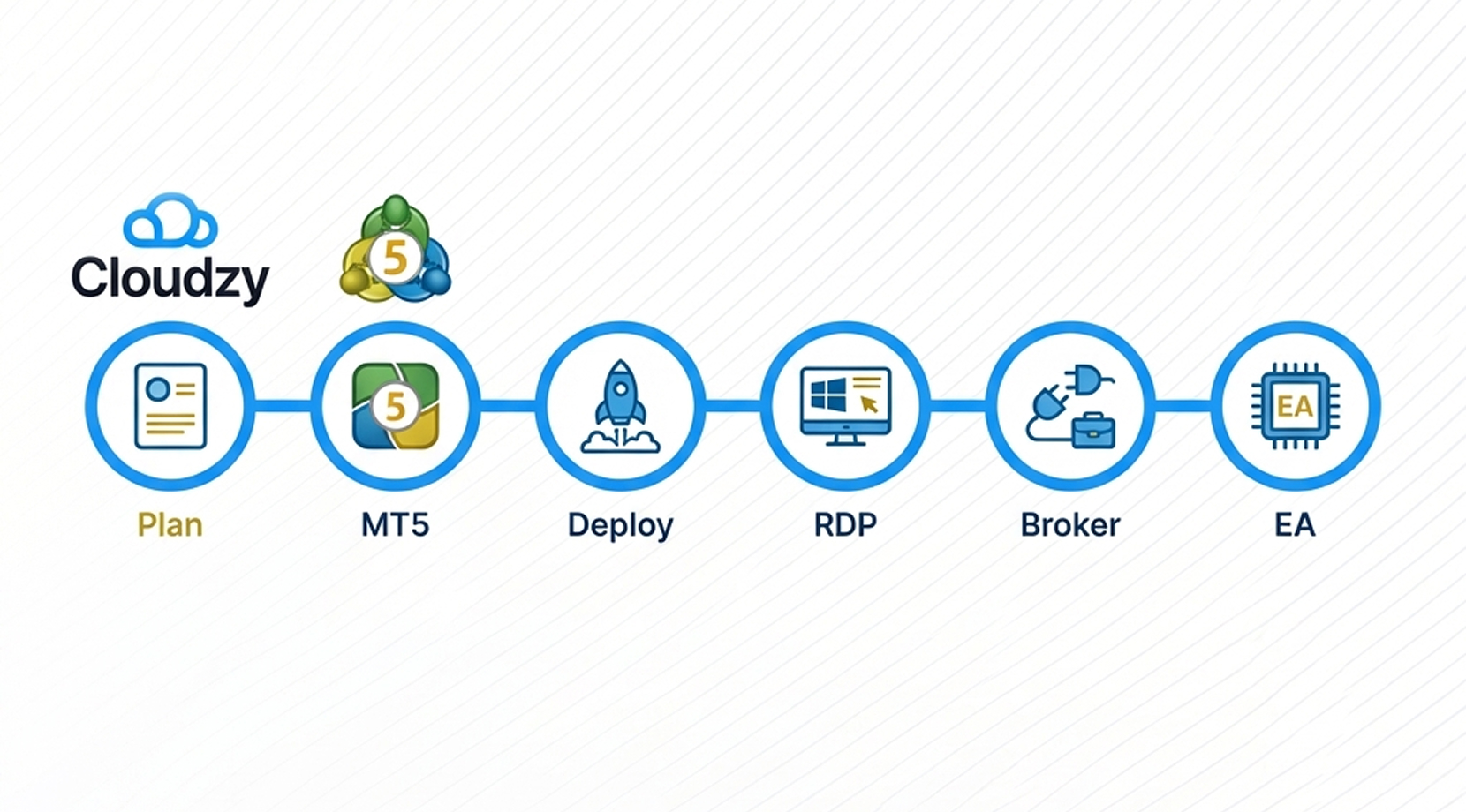
Pick a plan, choose the MetaTrader 5 image, and deploy the server. Open Remote Desktop to the static IP, log in with the credentials in your panel, then connect your broker account and load EAs. Follow our MetaTrader 5 Server VPS page for the walkthrough.
16+ Locations. Because Every Millisecond Matters
Deploy your VPS closer to users for optimal performance.


0Gbps Network Speed

0.00% Network Uptime

<0ms Average Latency

0/7 Monitoring





 Romania
Malaysia
Tokyo
Sydney
Romania
Malaysia
Tokyo
Sydney
120,000+ Happy Users. Are You Next?
Our services speak for itself. So do our users.
Engineering Without Interruptions



FAQ | MT5 VPS
What is an MT5 VPS?
An MT5 VPS is a remote Windows server that runs your trading terminal nonstop. It keeps charts, EAs, and signal subscriptions active even if your home PC restarts or loses power.
Is MT5 pre-installed on my VPS?
Yes. We are offering MetaTrader 5 as a one-click app during your VPS purchase process. With just one click, you can choose to have MT5 on your VPS, and we will deliver your VPS MT5 with your chosen Windows Server OS and the MT5 trading platform pre-installed.
Do I have to pay any extra fees for the pre-installed MT5?
No, you don’t. We do not charge any additional fees for installing MT5 VPS on your server.
How can an MT5 VPS help reduce slippage?
Hosting your terminal closer to your broker can cut round-trip time. Lower latency can reduce the odds of re-quotes and help limit slippage during fast moves.
Can Expert Advisors run 24/7 on an MT5 VPS?
Yes, as long as the terminal stays connected. A VPS keeps the platform running 24/7 so Expert Advisors and signals can keep executing, even with your laptop off.
How do I migrate my MT5 setup to a VPS?
Most setups copy your MT5 profile, charts, and EA files to the server, then you log in and connect your broker account. After that, you confirm permissions for DLLs and automated trading in settings.
What matters most when choosing an MT5 VPS location?
Pick a location with the lowest ping to your broker, not to you. Many traders test latency from several regions, then settle on the one that keeps execution consistent.
How do I log in to my Cloudzy MetaTrader 5 VPS?
You connect over Remote Desktop (RDP) to the static IP shown in your panel, then sign in as Administrator. From there, open MT5, add your broker account, and load indicators or EAs.
What security steps should I take on a Cloudzy MetaTrader 5 VPS?
Start with strong Administrator passwords and IP-restricted firewall rules. Keep Windows updates on, limit RDP access, and snapshot before major changes. Dedicated IPv4/IPv6 helps keep broker allowlists consistent.
Can I scale or snapshot a Cloudzy MetaTrader 5 VPS without reinstalling?
Yes. You can take snapshots before EA updates, then roll back fast if needed. Resizing applies after a reboot, and hourly billing makes it easy to test short-lived MT5 VPS instances.
Need help? Contact our support team.
 Submit a Ticket
 No Setup Fees
Deploy in 60 Seconds
Cancel Anytime
No Setup Fees
Deploy in 60 Seconds
Cancel Anytime
