
You checked Unbounce's pricing, saw the Build plan at $99/month, and quietly closed the tab. Fair enough. Paying that much to run a handful of landing pages is a hard sell when the product itself has not earned that back yet.
Most lists of the best landing page builders cover one path: monthly SaaS. But "landing page builder" really spans five very different paths -- dedicated SaaS tools, website builders with a landing-page mode, all-in-one marketing suites, WordPress plus a page-builder plugin you run yourself, and open-source options. Each path has a different cost structure, setup burden, and maintenance tradeoff.
So this is a buying guide that routes you by use case across all five, including the self-hosted WordPress path that's cheapest at scale. Instead of dumping features, this guide matches each situation to the tool I would actually use.
The Short Version
- Cheapest unbranded single page: Carrd. Pro starts at $9/year, no joke.
- Built for paid ads and A/B testing: Leadpages or Unbounce. You're paying for CRO tooling; if you're running traffic, it's worth it.
- Already on WordPress, or you want to own your pages: Elementor (or Beaver Builder / Divi) on a small VPS. A year of hosting can cost less than one month of a top SaaS plan.
- Need email and funnels too: Systeme.io's free tier, or self-hosted Mautic if you'd rather own the whole stack.
How to Choose: The Five Paths (and Which One Fits You)
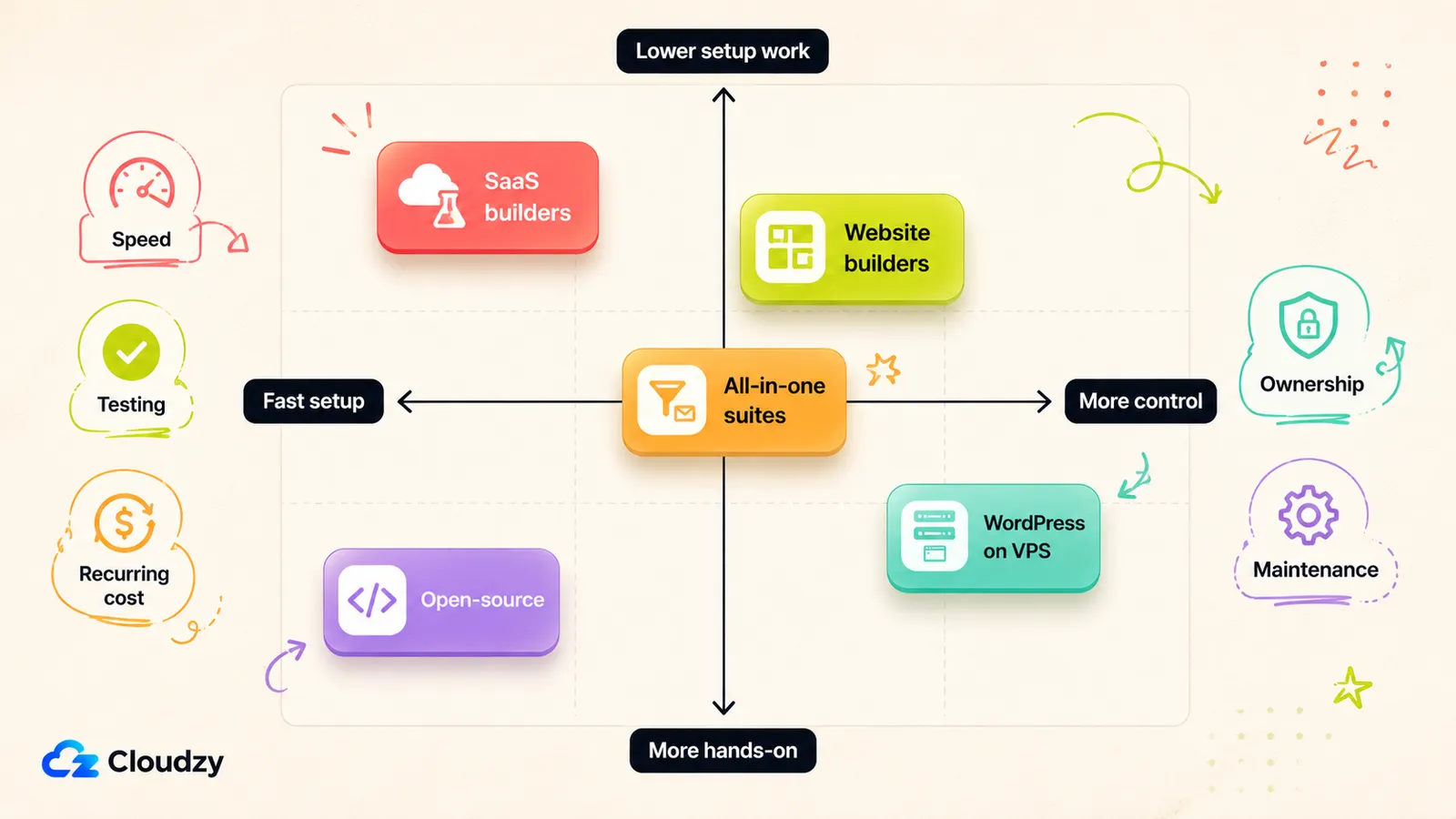
The five paths split on one question: how much do you want to pay every month versus how much setup are you willing to do once? SaaS buys speed and zero maintenance for a recurring fee. Self-hosting flips that: more setup up front, lower recurring costs, and maintenance you now own. The options fall along that speed-versus-control spectrum:
- Dedicated SaaS builders (Unbounce, Leadpages) -- fastest path to a converting page with built-in A/B testing. You rent it monthly.
- Website builders with a landing-page mode (Webflow, Framer, Carrd) -- more design freedom, and they double as your actual site. Not conversion-optimised out of the box.
- All-in-one marketing suites (Systeme.io) -- pages plus email and funnels in one tool. Cheaper overall if you need all three.
- WordPress + a page-builder plugin on a VPS (Elementor, Beaver Builder, Divi) -- you host it, you own it, the recurring cost is just the server.
- Open-source self-hosted (Mautic) -- free license, full control, more of a project to stand up.
One quick reality check before you pick: a lot of what gets sold as a "landing page builder" is really a full website builder with a landing-page mode bolted on. If you only need one converting page, you can end up paying for an entire site builder you'll barely touch.
Use this table to compare the main options by type, cost, testing support, and hosting model:
| Tool | Type | Starting price | A/B testing | Self-hosted | Best for |
|---|---|---|---|---|---|
| Carrd | Website builder | Free / $9-$19/yr Pro | No | No | Cheapest single launch page |
| Unbounce | SaaS builder | $29/mo Starter; $149/mo for A/B testing | Experiment plan+ | No | Paid-ads CRO once traffic/testing matter |
| Leadpages | SaaS builder / CRO suite | $10/mo HTML Pub; Leadpages Grow from $99/mo list price | Leadpages product plans | No | Unlimited-traffic CRO without visitor caps |
| Webflow | Website builder | Free / $15/mo | Native add-on (Optimize) | No | Pages that double as a full site |
| Framer | Website builder | $10/mo | Add-on (Pro+) | No | Design-led pages, fast |
| Systeme.io | All-in-one suite | Free / $17/mo | Yes | No | Pages + email + funnels in one |
| Elementor (on WordPress) | WP plugin | Free / from $5/mo billed annually | Via add-ons | Yes | Owning your pages on a VPS |
| Mautic | Open-source | Free (self-host) | Yes | Yes | Self-hosted automation + pages |
Prices are starting tiers as of June 2026 and shift often, so check each tool's pricing page before you commit. From here, the better question is which tool fits your use case.
Hosted Builders (When Paying Monthly Is Worth It)
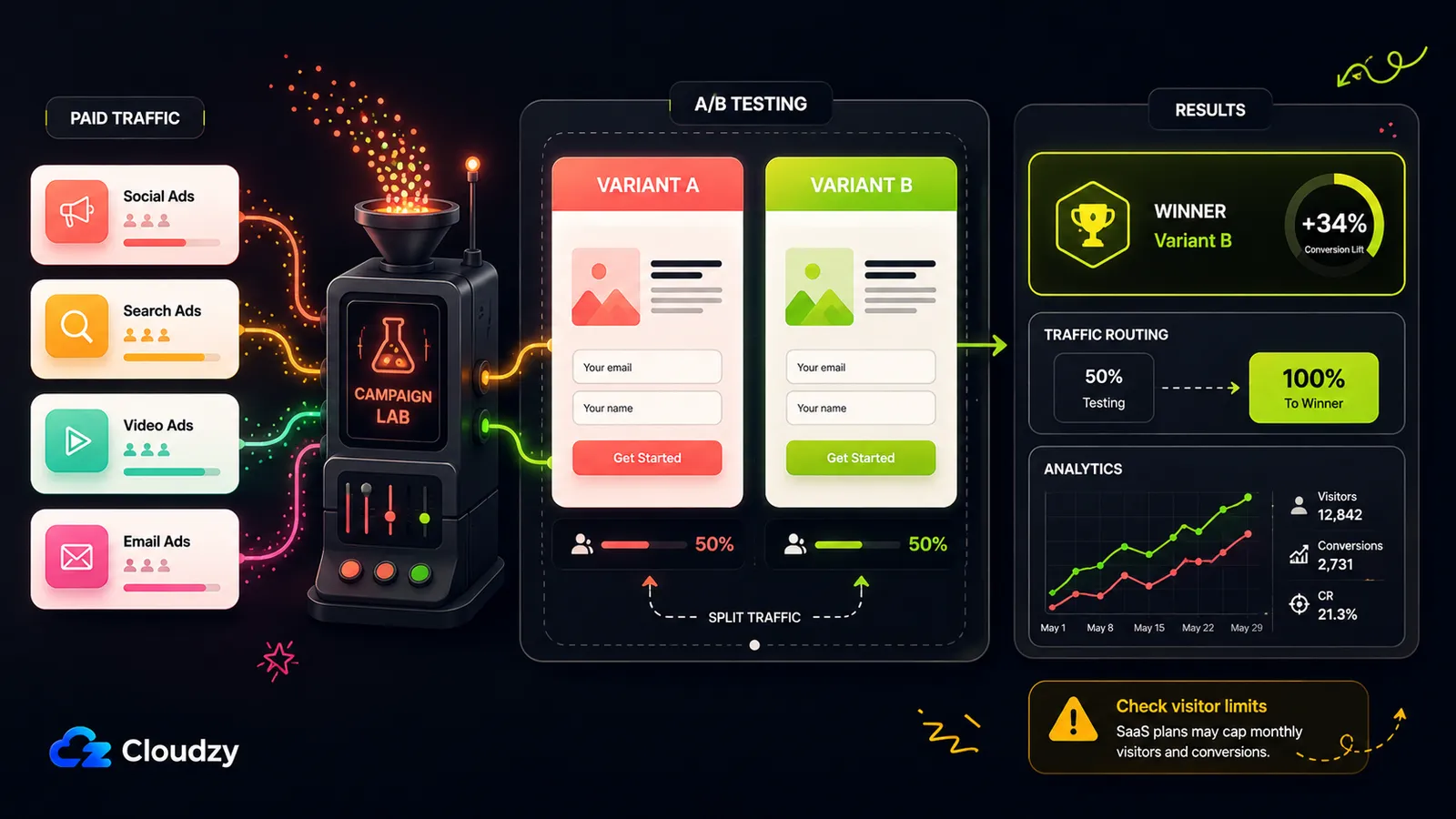
If you're running paid traffic to an offer, the SaaS tools earn their fee. A/B testing, traffic routing, and analytics are built in, and you're not babysitting a server while a campaign is live. That's the case for paying monthly. Below that use case, it gets harder to justify.
On the Leadpages vs Unbounce question (the two that always come up), they're closer than the price gap suggests, but they're not the same shape.
Unbounce is the conversion-heavy one, but the useful features sit above the entry tier. According to the official pricing page, Starter is $29/month and capped at 500 visitors, which a single decent ad day can blow through. Build is the $99/month plan for unlimited pages, Experiment is where unlimited A/B testing starts, and Optimize is where AI traffic optimization comes in. Unbounce also charges overage fees if you exceed plan limits, so the cheap Starter tier is real, but it's not the plan I'd pick for paid traffic.
Leadpages is the cheaper way into a no-traffic-cap workflow, but with a wrinkle worth knowing. It now runs two product lines: HTML Pub, the lower-cost publishing layer that starts at $10/month, and Leadpages proper, the CRO product that adds A/B testing, lead enrichment, heatmaps, and AI-powered optimization. Leadpages' pricing page says all Leadpages plans include unlimited traffic, so you're not sweating a visitor cap. Just don't compare HTML Pub directly with Unbounce's Experiment or Optimize tiers; HTML Pub is for publishing, while Leadpages Grow and above is the real CRO comparison.
Then the lighter end, where most solo builders actually live. Carrd is single-page only with no A/B testing, but it is one of the cheapest hosted options for a waitlist or simple launch page (Carrd's Pro plans). Webflow gives you serious design control and doubles as a full site, so you're not paying for two tools; just note that A/B testing now sits in Webflow Optimize, a native optimization add-on, and Webflow updated its pricing in May 2026 (see updated plans), so older roundups are stale. Framer is the design-led one with the prettiest defaults; A/B testing is part of the Convert add-on for Pro, Scale, and Enterprise sites.
My take: spending on ads, go Unbounce or Leadpages. Just need one page that looks good and converts? Carrd or Framer does it for a fraction of the money.
The Self-Hosted Path (WordPress + a Page Builder on a VPS)
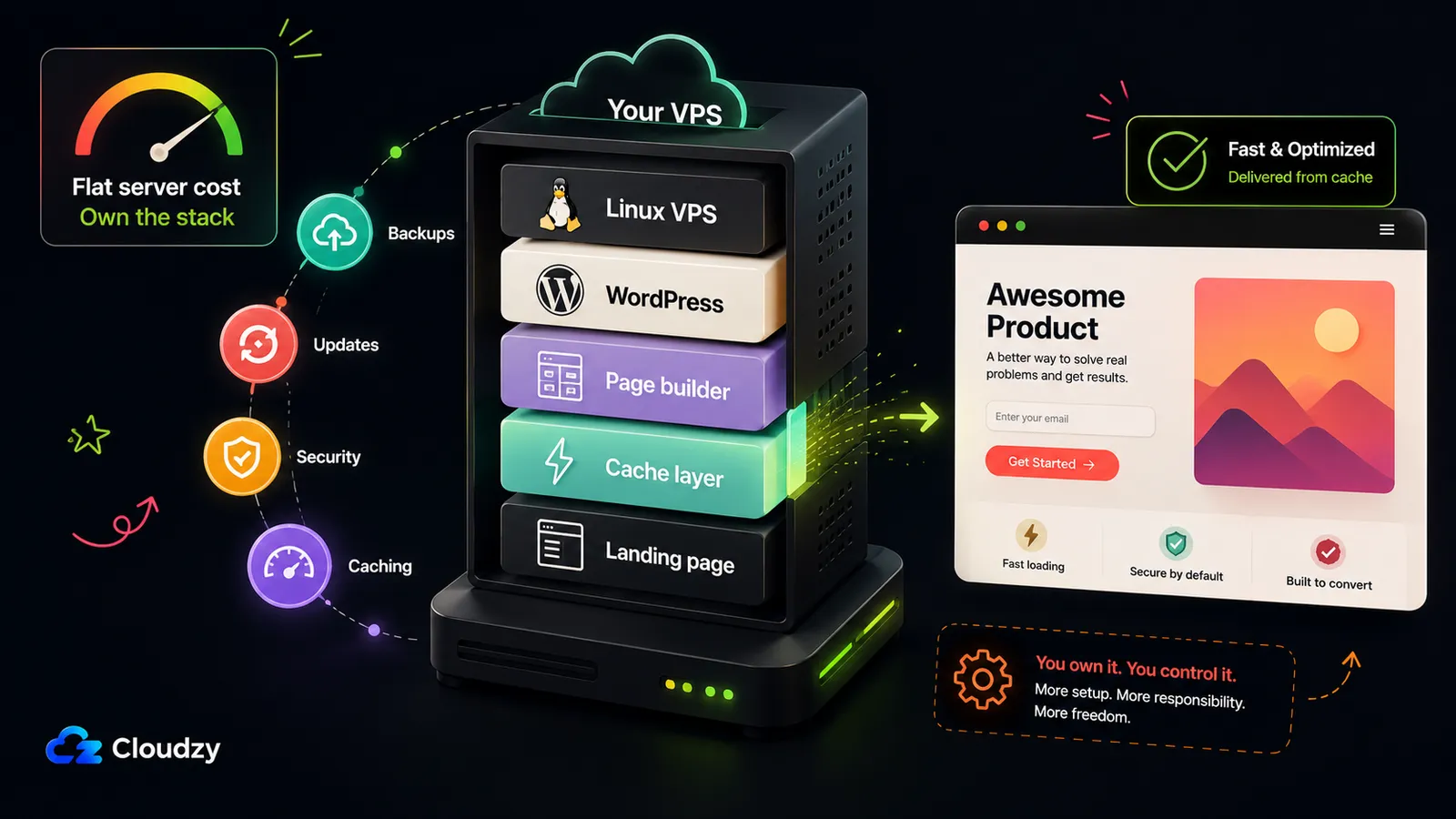
This one's for you if you're already running WordPress, or if you're tired of renting your pages and want to own them outright. The trade is simple: you swap a recurring monthly fee for a one-time setup and some light ongoing maintenance.
The stack is WordPress + a page-builder plugin. Elementor is the popular pick, with Beaver Builder and Divi as the main alternatives. Elementor has a free tier that's genuinely usable for a landing page, and the cheapest paid plan currently starts around $5/month billed annually, per Elementor's pricing page. One thing to be clear about: Elementor is a WordPress plugin you install yourself, not a one-click app on its own. You install WordPress, then add the plugin.
The cost advantage is the main reason to consider this path. A small VPS for a year often costs less than a single month of a top-tier SaaS plan, and once it's up you can run as many pages as you like for that flat server cost. At any kind of scale, nothing else here gets close on price.
The cheap self-hosting argument leaves out one important caveat. Self-hosting is more work than clicking "sign up." You stand up a server, sort out caching so pages load fast, and keep WordPress and your plugins updated. The work is manageable, but it is still real operational work: updates, caching, backups, security, and occasional troubleshooting. If "more work" is a dealbreaker, a SaaS fee is essentially buying that time back, and that's a legitimate thing to pay for.
On where to host it: shared hosting is cheapest but you hit resource ceilings and lose control; managed WordPress removes the server admin but charges a markup for it. A VPS sits in the sweet spot: full root access and proper resources without the managed premium. (For the broader site-builder framing, see our Webflow vs WordPress comparison.)
Pro Tip
Page-builder plugins like Elementor and Divi are heavier than a plain WordPress theme. They pull in more CSS and scripts, so they want a bit more breathing room than a bare install. For a cached WordPress landing page, a small VPS with a couple of GB of RAM is plenty; give it 4 GB if you're running a heavier builder stack or expecting real traffic. You don't need a big machine. You need caching switched on.
You don't have to build the box by hand, either. One-click WordPress installs exist. Cloudzy's marketplace has one (standard WordPress, plus an OpenLiteSpeed build tuned for page speed), so the base stack is live in a few minutes and you spend your time on the pages instead of server setup. Then you add Elementor and you're off. Spin it up from the Cloudzy WordPress marketplace page, or start from a plain Linux VPS if you'd rather configure it yourself.
The verdict on self-hosting: it's the cheapest path at any real scale, but only if you'll tolerate roughly 30 minutes of setup and the occasional update. If you won't, that monthly SaaS fee is buying you out of exactly that, and that's a fair trade.
The Open-Source and All-in-One Options
If you need more than a page (email capture, funnels, a bit of marketing automation), a dedicated landing page builder isn't your tool. Two options actually fit here.
Systeme.io has a free tier that's hard to argue with: up to 2,000 contacts and a handful of sales funnels, confirmed on Systeme.io's pricing page. For course sellers and funnel builders who want pages, email, and a checkout in one place, the free plan does a startling amount before you pay a penny.
Mautic is the open-source route: a full marketing-automation platform that includes a drag-and-drop landing page builder and embeddable forms, as Mautic's own feature page lays out. The license is free; you self-host it. One caveat: its main job is automation, so standing up Mautic just for a single landing page is using a sledgehammer on a drawing pin. But if you already wanted self-hosted automation, the built-in builder means one fewer tool to pay for, and it's a one-click install on Cloudzy's marketplace if you'd rather skip the manual setup.
Worth a one-line mention so you can rule it out: GrapesJS is open-source and turns up in these searches, but it's a developer framework for building page editors, not a ready-to-use tool. Unless you're shipping your own builder, skip it.
Frequently Asked Questions
What's the Cheapest Landing Page Builder?
Carrd is the cheapest hosted option: its paid Pro tier costs only a few dollars a year and drops the branding. But longer-term, self-hosting WordPress with a free or cheap page-builder plugin on a small VPS can be cheaper at any real scale, because you pay one flat server cost no matter how many pages you run. Carrd wins for a single quick page; self-hosting wins once you're running several.
Can I Self-Host a Landing Page Builder on My Own VPS?
Yes. The common path is WordPress plus a page-builder plugin like Elementor or Beaver Builder, which you install and run on your own server. Mautic is an open-source alternative that bundles a landing page builder into a full marketing-automation suite. One-click WordPress installs exist, so you don't have to configure the server from scratch.
Is Carrd Good Enough for a Real Product Launch?
For a single-page launch, a waitlist, or a simple offer, Carrd is perfectly fine and very cheap. You'll outgrow it the moment you need multiple pages, built-in A/B testing, or deeper integrations, since it's single-page only by design. Start there if your launch is one page; plan to move if it isn't.
What's the Difference Between a Landing Page Builder and a Website Builder?
A landing page builder is built around a single conversion goal: it leans on forms, A/B testing, and analytics to turn visitors into leads or buyers on one focused page. A website builder manages a whole multi-page site, so conversion tooling is a secondary concern rather than the point.
How Much VPS Do I Need to Self-Host WordPress for Landing Pages?
A small VPS with a couple of GB of RAM is enough for a cached WordPress landing page under normal traffic. If you're running a heavier page-builder stack like Elementor or Divi, or expecting real volume, step up to around 4 GB for comfortable headroom. The bigger lever is caching: switch it on and a modest machine handles a landing page fine.



Discussion
Comments
Sign in to join the discussion.