
MetaQuotes' release notes for Build 6060, dated 23 July 2026, put an AI Assistant inside the MetaTrader 5 terminal and MetaEditor. The same build opened MCP servers that let outside agents like Claude Code read your account data, run the Strategy Tester and place trades. Four more builds followed by 24 September.
That's a lot of change in nine weeks. MT5 itself is MetaQuotes' free multi-asset trading terminal; your broker supplies the account and the execution. So this MetaTrader 5 review asks one question: does the AI layer change the verdict on MT5 as the place to build and run trading automation, or just lengthen the feature list?
Is MetaTrader 5 Worth It?
For building, backtesting and running Expert Advisors (EAs), MetaTrader 5 is still the platform to commit to: 4/5. MQL5 and the Strategy Tester have, I'd argue, no free equal at retail brokers, and the 2026 AI layer helps if you can read its code. Plan around a dated interface, builds that shift backtests, and Wine on Mac and Linux.
I weight the score toward the language and the tester, the part automation rests on, so it sits above the interface and update ratings below.
MT5 is a strong fit if:
- You write, commission or port MQL5 EAs at a broker that offers MT5.
- You want an AI coding agent driving EA work and backtests over MCP, against a demo account.
- You run MT4 EAs at a broker that has already set an MT4 end date.
Look elsewhere if:
- You trade by hand from charts and never automate. Charting is MT5's weak spot.
- You'd run EAs unattended from a Mac or Linux machine with no Windows box in the picture.
- You expect the AI Assistant to hand you a working strategy without reading MQL5 yourself.
Two things flip the verdict: if your broker doesn't offer MT5, none of this applies, and if your research needs frozen, reproducible builds for months at a time, expect frustration.
How this review was done: I didn't install MetaTrader 5 or run it on an account for this one. It's built from MetaQuotes' release notes for Builds 6060 through 6230 (the newest dated 24 September 2026), its help pages and hosting rules, and reports from traders and EA developers on the MQL5 forum and Reddit. I build software and have tested plenty of AI coding agents, but trading-desk depth isn't my claim, so the trading mechanics lean on MetaQuotes' docs and the people who run EAs. Neither MetaQuotes nor any broker sponsored this review or supplied anything for it.
Where MetaTrader 5 Still Leads: MQL5 and the Strategy Tester
MT5's lead is automation depth. You write EAs in MQL5 and test them in the Strategy Tester inside the same free terminal your broker already supports, so you test on the platform you'll trade on. That's what every weakness MT5 has must outweigh.
Start with the Strategy Tester's testing modes. “Every tick based on real ticks” uses broker-recorded ticks where available, while “Every tick” generates simulated ticks. “1 minute OHLC” trades detail for speed, and “Open prices only” is the quick, rough pass. The same EA can produce different results in each, so the mode is part of the result.
Around that sits the rest of the research kit, roughly in the order I'd care about it:
- Forward testing, which holds back part of the history to check whether optimized parameters survive data they weren't fitted on. It's the one that catches an over-fit optimizer.
- Distributed optimization across your own machines or the MQL5 Cloud Network, a pool of computers other users contribute (and get paid for). It earns its keep once a single optimization would run all night.
- A "Random Delay" stress mode that simulates network and dealer delays, the closest the tester gets to a bad-fill day.
- Multi-currency testing: one EA, several symbols, one run.
- Visual testing, bar by bar, for seeing why an EA did what it did.
If you'd rather research in Python, MetaQuotes ships an official MetaTrader5 package (pip install MetaTrader5) that pulls data straight from a running terminal over inter-process communication. The same documentation page notes that MQL5 can call third-party C++ DLLs on the desktop: compiled Windows libraries an EA leans on for work MQL5 can't do by itself.
Position accounting covers both systems. Hedging lets you hold several positions on one instrument in either direction, while netting keeps one combined position per instrument, the way exchanges do.
MetaQuotes says its Market holds more than 2500 ready-made apps. Finance Magnates Intelligence puts MT5 at 65% of retail CFD volume on MetaQuotes' platforms in Q1 2026.
The price is MQL5 itself. In a 72-comment r/Forex thread asking who uses MT5, one commenter staying on MT4 points to its bigger pool of free scripts and EAs and finds MQL5 harder to build in.
Building and testing automation: 4.5/5. The tester alone justifies the MQL5 learning curve.
The MetaTrader 5 AI Assistant and MCP Support Added in 2026
Since Build 6060, both the MT5 terminal and MetaEditor have a built-in AI Assistant, and MCP (a standard that lets an outside AI agent call an app's tools) gives agents like Claude Code and Codex access to the terminal, MetaEditor and MetaQuotes' market data. The useful part is MetaEditor and the tester. The part to configure first is trading.
What Builds 6060 to 6230 Added
Five builds grew the AI layer from 23 July to 24 September 2026: 6060 added the assistant and three MCP servers, 6090 let it add indicators to charts, and 6140 added more providers and halved MQL5 Lite's context window (still "sufficient," MetaQuotes says). Builds 6180 and 6230 let it read tester reports and logs, launch EAs and read their inputs.
| MT5 build number | Release notes dated | What it added |
|---|---|---|
| 6060 | 23 July 2026 | AI Assistant in the terminal and MetaEditor; terminal, metaeditor and marketdata MCP servers; Claude Code and OpenAI Codex named as clients; Passkey login; MetaEditor code folding |
| 6090 | 30 July 2026 | AI Assistant can add indicators to charts and list available indicators with their parameters; AI Assistant disabled on Windows 7 |
| 6140 | 20 August 2026 | More LLM providers (Alibaba, Atomic Chat, Bitdeer AI, Cerebras, z.ai and others); MQL5 Lite context window cut from 1 million to 500,000 tokens; MCP tool to stop the tester |
| 6180 | 3 September 2026 | AI can read Strategy Tester reports, settings and logs, help configure optimization, add indicators, and read terminal and EA logs |
| 6230 | 24 September 2026 | AI can read EA inputs to prepare tests, launch EAs and scripts on charts, remove EAs and indicators, and read Economic Calendar data |
By default the assistant runs on MetaQuotes' free MQL5 Lite plan, with the API key added when you sign in to MQL5.community. You can bring your own key instead; supported providers include Anthropic, OpenAI, Gemini, DeepSeek and xAI.
The terminal and metaeditor MCP servers run on your own machine by default, behind a bearer token, while marketdata is hosted by MetaQuotes, which even prints copy-paste configs for Claude Code and Codex. (Build 6060 also killed FTP report publishing.)
I've watched AI coding agents write code that compiles, survives a glance, and quietly does something else, and trading code is the worst place for that. The top answer in an r/algotrading thread on coding with Claude puts it plainly: "AI loves to take shortcuts that will completely change what is being calculated." Another reply there flags lookahead bias, where the code uses data it wouldn't have had yet. The MetaEditor assistant makes someone who can read and test MQL5 faster. It doesn't replace that skill.
Permissions and the Data That Leaves Your Terminal
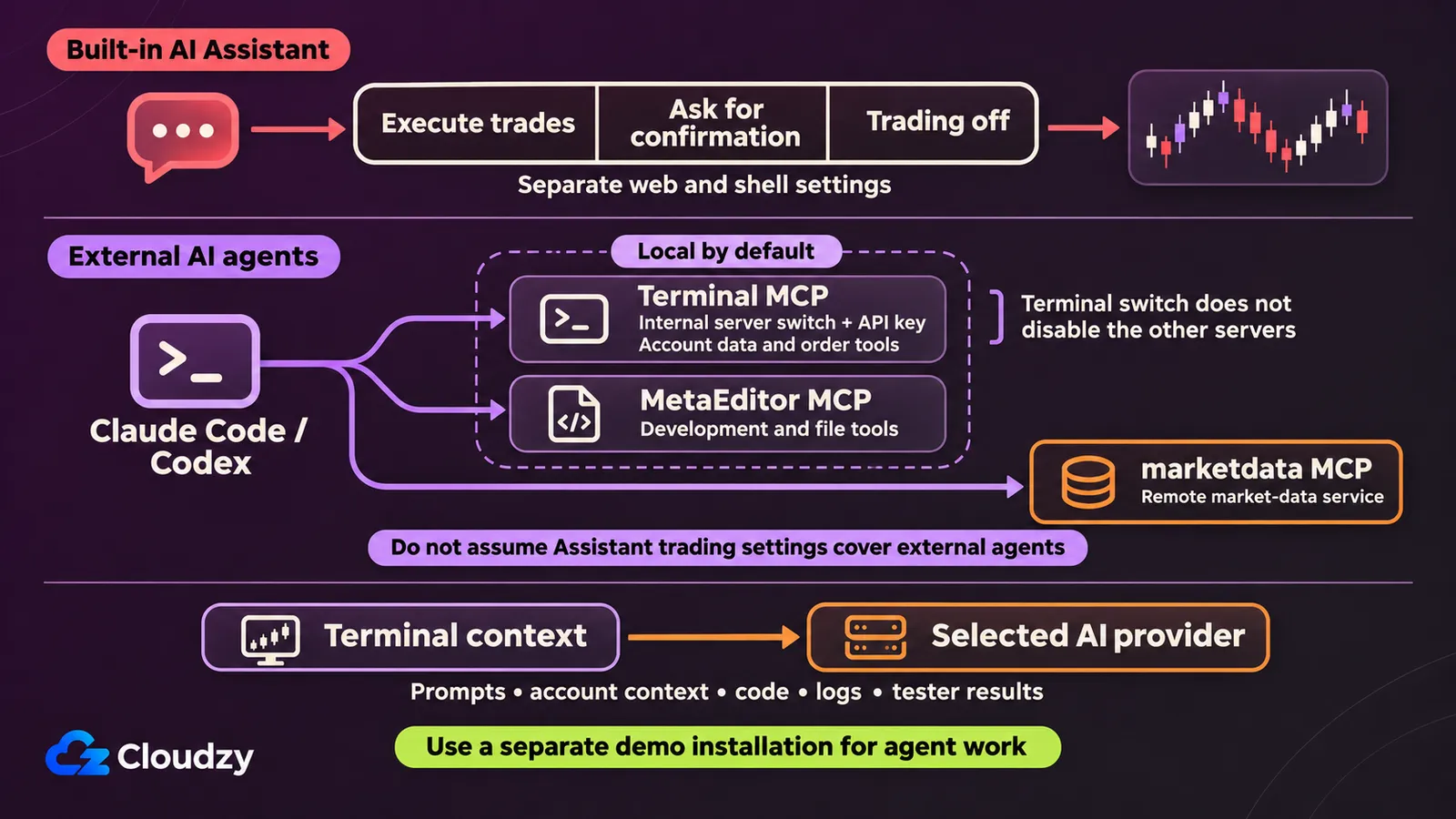
MetaQuotes' configuration help gives the AI Assistant three trading options: execute trades, request explicit confirmation, or not trade at all. Separate settings cover web access (full, GET requests only, or none) and a "Dangerous shell operations: PowerShell, Python, etc." option (MetaQuotes' label, and a fair one) that lets the assistant run commands outside its MQL5, Tester, Logs and Common sandbox.
Those settings apply whichever provider you pick. Outside agents come in through a different door. Claude Code or Codex connect to the terminal's built-in MCP server, which has its own "Enable internal server" switch and API key, and whose tools include placing and managing orders. MetaQuotes' pages don't say whether the assistant's Trading setting also limits those agents.
The pages read for this review don't say what the Trading setting defaults to, either. So my rule: before a live account touches a terminal with the assistant on, open Tools > Options > AI Assistant and set Trading to confirmation or off yourself.
Same for agents. Keep the internal MCP server off on any terminal with a live account, and point Claude Code or Codex at a separate demo installation. That switch controls the terminal server only; it doesn't disable the MetaEditor or marketdata servers. Keep agents away from the live installation's MetaEditor and files too. I'd leave the shell option off unless a specific task needs it.
On privacy, MetaQuotes' Renat Fatkhullin wrote on the MQL5 forum that with MQL5 Lite and MQL5 Premium "we do not save/share your data," and that with external providers "everything depends on their conditions." That covers MetaQuotes' own plans only; pick Anthropic or OpenAI and their terms apply.
The 2026 AI layer: 3.5/5. Useful for code and tester work, but a moving target whose trading default MetaQuotes' help doesn't state.
Where MetaTrader 5 Falls Short
The AI builds didn't fix MT5's dated interface or its charting gaps. The newer problem is pace: MT5 automatically installs downloaded updates on restart, build changes can affect backtests, and on macOS and Linux the terminal runs inside Wine. None of it sinks MT5 for automation, but each weakness needs a plan before you commit.
A Dated Interface With Gaps in Charting
MT5 looks dated, and its charting has gaps that show when you trade by hand: missing chart types, no on-chart replay, and limited built-in alert conditions. On paper the toolkit is broad, and some of what traders blame on MT5 is set by their broker.
The top-voted complaint in the r/Forex thread on who uses MT5 is blunt: MetaTrader 4 and 5 feel "like going back to Windows 98."
MT5's built-in chart types are bars, Japanese candlesticks and a line; specialist views need custom tools. Its built-in alert editor supports price, last-deal volume and time conditions. Indicator- and strategy-based alerts need custom indicators, EAs or another integration.
The numbers on paper are fine: 21 timeframes, 38 built-in indicators and 44 analytical objects. Your chart's server time is whatever your broker runs, and the broker decides whether you get a netting or hedging account.
The counterpoint comes from the same r/Forex thread: an algo trader who hated MetaTrader's look stopped minding the clunky UI because what he can do with MQL5 counts for more.
Interface and charting: 2.5/5. It stays out of an EA's way, which is all an EA needs from it.
Forced Updates That Shift Backtest Results
Builds arrive often, and MT5's automatic updater can't be disabled: it downloads updates in the background and installs them on restart. Separately, MetaQuotes' July 2025 minimum-version deadline stopped MT5 builds older than 4755 from connecting to broker servers. Builds can move results too. After updating to Build 6140, one user reported on the MQL5 forum in late August 2026 that optimizing an EA across timeframes returned results for only one.
Clearing the tester cache and recompiling didn't fix it for him. The pace is its own complaint: in a March 2026 thread titled "Very annoying updates", an MT5 user running EAs describes near-weekly forced updates that each mean re-verifying strategy behavior, and asks why there's no long-term stable (LTS) version or way to postpone.
A forum moderator's reply there is worth knowing: a terminal connected to the MetaQuotes-Demo server makes you a beta tester who gets the constant builds, while one connected only to your broker's account shouldn't.
The practical answer is a test discipline:
- Record the build number next to every backtest result, along with the testing mode.
- After a build change, re-run your important tests before trusting older numbers.
- Test on your broker's demo server, not on MetaQuotes-Demo.
macOS and Linux Run It Inside Wine
MetaQuotes' macOS installer downloads Wine, configures it, and installs MT5 inside it, and Linux gets the same treatment. Wine is a compatibility layer that runs Windows software on other systems, so every OS update has two things it can break instead of one.
The Mac version needs macOS Catalina 10.15.7 or later and supports Apple chips from M1 on. MetaQuotes' Linux page says the platform runs on Linux using Wine and offers an install script for Ubuntu, Debian, Linux Mint and Fedora.
The forums show what breaks. In a February 2026 MQL5 forum thread, a user on macOS 26 found Strategy Tester agents failing on two Macs with "start failed, not enough permissions" in the agent log. The moderator's advice: get Windows through Parallels and spend your time on the strategy.
My take for EA work on a Mac: use a Windows PC, or Windows in a virtual machine like Parallels, and keep the Wine build for checking charts. The Mac problem isn't unique to MT5, either, and macOS stays a complicated OS for trading software in general.
Update stability and OS support: 2.5/5. Budget for re-running tests after every build, and for a Windows box behind anything unattended.
Running Expert Advisors Around the Clock
An EA trades only while its terminal is running and connected. A laptop that sleeps or a home PC that restarts for Windows updates stops it cold, so overnight and weekend automation needs a machine that stays on. MetaQuotes' own answer is MQL5 Virtual Hosting.
You rent it from inside the desktop terminal, from USD 15 for one month as of 17 November 2026, or USD 120 for 12 months (USD 10 a month), with up to 3 GB of RAM and 16 GB of disk per virtual terminal, per MetaQuotes' hosting price list. The minimum term is one month, and the full refund only applies if you cancel within the first 24 hours.
Independent hosting companies own the servers, which is why MetaQuotes' rules say it makes no guarantees of smooth operation (an odd line in something you pay for, but at least it's upfront). Weekend maintenance can take up to 4 hours a day.
For one MQL5 EA on one account with no DLLs, that's the right answer, and the simplest one.
The hosting rules are also where it stops fitting:
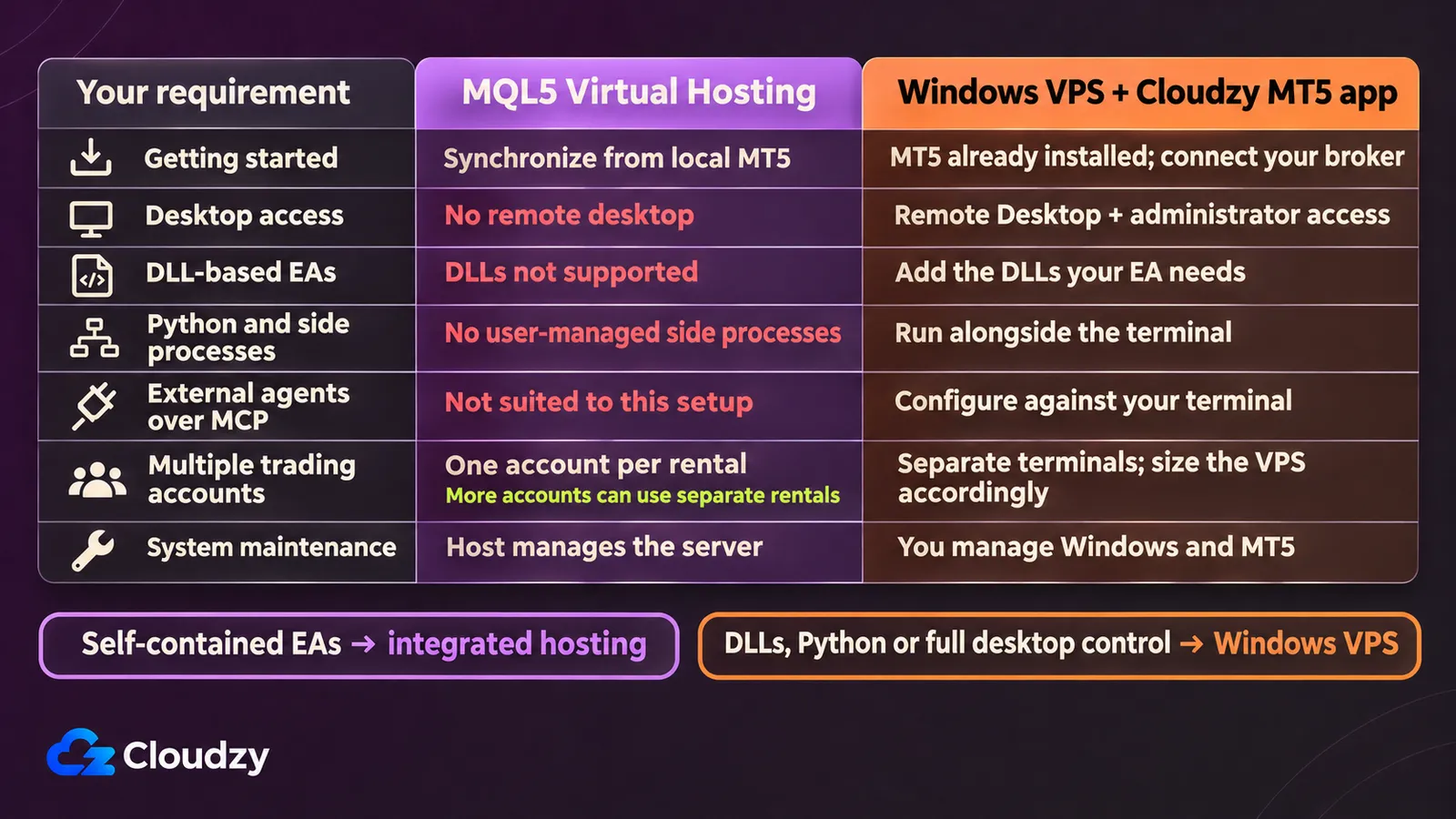
- No DLLs. Any DLL call stops the program with a critical error, so an EA that needs MetaTrader's Allow DLL imports option to work is out.
- One trading account per rented terminal, so three accounts means three rentals.
- Up to 32 EA charts on paid hosting, 16 on free hosting.
- No physical or desktop access to the rented terminal.
- Nothing changes on the hosted copy until you synchronize again.
Those limits rule out an EA that calls a DLL, a Python process reading from the terminal, or an AI agent working against the terminal's MCP server. Several accounts remain possible through separate rentals; you just can't consolidate them into one rented terminal.
MetaQuotes' configs put that MCP server on a local address by default, and its docs describe the Python package as talking to a running terminal. I read that as both needing a Windows machine you control right next to the terminal, which a rented terminal with no desktop access doesn't give you. That machine has to stay on, and someone has to notice when an update stops the terminal.
Running EAs unattended: 3.5/5. Integrated and cheap for self-contained EAs. DLLs and side processes need a different setup; additional accounts need additional rentals.
If you want your EAs running while your own computer is switched off, a Windows VPS gives MT5 a separate machine that stays online. You can access the trading desktop remotely from your Mac, Linux PC or Windows laptop, then disconnect while the terminal continues running on the server.
Our MetaTrader 5 one-click app makes that setup quick and straightforward: your Windows VPS comes with MT5 already installed, so you can skip the manual installation. Connect through Remote Desktop, sign in to your broker and load your EAs. Administrator access also lets you add DLLs, Python tools or other software as your setup grows.
Switching From MT4: Deadlines Are Set by Brokers
MetaQuotes hasn't set a universal MT4 shutdown date. Brokers set their own, and OANDA Japan, for one, has published dates: new MT4 orders stopped after the close on 25 September 2026, and MT4 service, demo and live, ends after the close on 27 November 2026, per OANDA Japan's notice (in Japanese).
OANDA cites stricter cybersecurity standards and says MT4 is outside MetaQuotes' system maintenance. That's OANDA's reading.
MetaQuotes announced in January 2018 that it would stop issuing MT4 licences to new broker clients, but its May 2025 notice says each new MT4 version brings fixes and security improvements for the Market service. And Finance Magnates Intelligence found North America is the one region where MT4 beats MT5 on web visibility.
Your EAs won't come along on their own. MQL4 code has to be converted to MQL5, so check how MT4 and MT5 differ for automation before you scope the job. MetaQuotes' own example prompts for the MetaEditor assistant include converting an MQL4 EA to MQL5, which is a vendor's example, not a promise it works on yours.
My rule: switch when your broker sets a date or when you start a new EA. Port and re-test on a demo account first.
When Another Platform Fits Better
MetaTrader 5's alternatives each win on one need: TradingView for chart-first manual trading, cTrader when your broker offers it and MT5's interface is the dealbreaker, and a Python-first stack when your broker has its own API. Finance Magnates Intelligence put 15.7% of retail CFD volume on platforms other than MT4 or MT5, taken together, in Q3 2025.
TradingView has the modern chart types MT5 lacks and Pine Script, which is simpler for indicators, and two commenters in the r/Forex thread on who uses MT5 chart there and execute elsewhere.
cTrader is where some r/Forex users went to get away from MT5's interface. Like MT5, it comes from your broker, and cTrader's broker list is shorter than MetaTrader's.
A Python-first stack keeps your research and execution code in Python end to end, with no terminal in the middle. You give up the Strategy Tester and build the plumbing yourself.
Frequently Asked Questions
Is MetaTrader 5 Good for Beginners?
It's a reasonable first terminal if your broker offers it. MetaTrader 5 is free, and brokers provide demo accounts to practice on. Expect a dated interface, and know that MQL5, the language behind automated trading on MT5, is the steep part if you later automate. Start on your broker's demo server before trading live.
Is MetaTrader 5 Safe?
MetaTrader 5 is software from MetaQuotes. Your broker holds the account and executes the trades, so most of your safety depends on which broker you connect it to. Download MT5 from metatrader5.com or your broker's site. Since Build 6060, MT5 supports Passkey login, which uses a registered phone or a hardware security key, but your broker has to enable it.
Can AI Trade on MetaTrader 5?
Yes, since Build 6060 (July 2026). MT5's built-in AI Assistant trades within its Trading setting: execute trades, request explicit confirmation, or not trade at all. Outside agents such as Claude Code or Codex connect through the terminal's MCP server, which has its own on/off switch and API key, and MetaQuotes' pages don't say whether the Trading setting covers them.
Is MQL5 Worth Learning?
Yes, if you'll automate trading at forex or CFD brokers that offer MetaTrader 5. MQL5 is what EAs, the Strategy Tester and MetaQuotes' Market all run on. The catch: it only works inside MetaTrader, and AI coding help needs you to read and check the code it produces.





Discussion
Comments
Sign in to join the discussion.