
OpenCode is a free, open-source AI coding agent made by a company called Anomaly. The difference from a chat window is where it works: you open it in a folder on your computer, and it reads the files there, edits them, and runs commands to finish the job you described.
That access is also the trade at the center of this OpenCode review. It's what makes the agent useful to someone who doesn't write code, and it's why the default settings matter before you hand it anything important. It runs in a terminal, as a desktop app or inside code editors, and it can use free models or an AI subscription you already pay for.
The Short Version
Is OpenCode worth it? Yes, for most people who want an AI agent working on their own files without a new subscription. It costs nothing and runs on free models or a ChatGPT Plus or GitHub Copilot plan you already have. The model you connect does the thinking and sets the quality ceiling. I rate it 4 out of 5.
The condition: out of the box it edits files and runs commands without asking first. Switch on approval prompts before you point it at files you care about, then start in Plan mode to discuss the work. Plan mode is for planning, but it does not by itself require approval for shell commands. If you want to build and launch a full app with nobody to check the result, a more guided paid tool is the easier place to start.
The 4 isn't an average of the section scores. Safety and project stability score lower. Approval prompts reduce accidental changes, but they don't isolate the agent from your computer, and stability is worth keeping an eye on as new releases land.
How Does OpenCode Work?
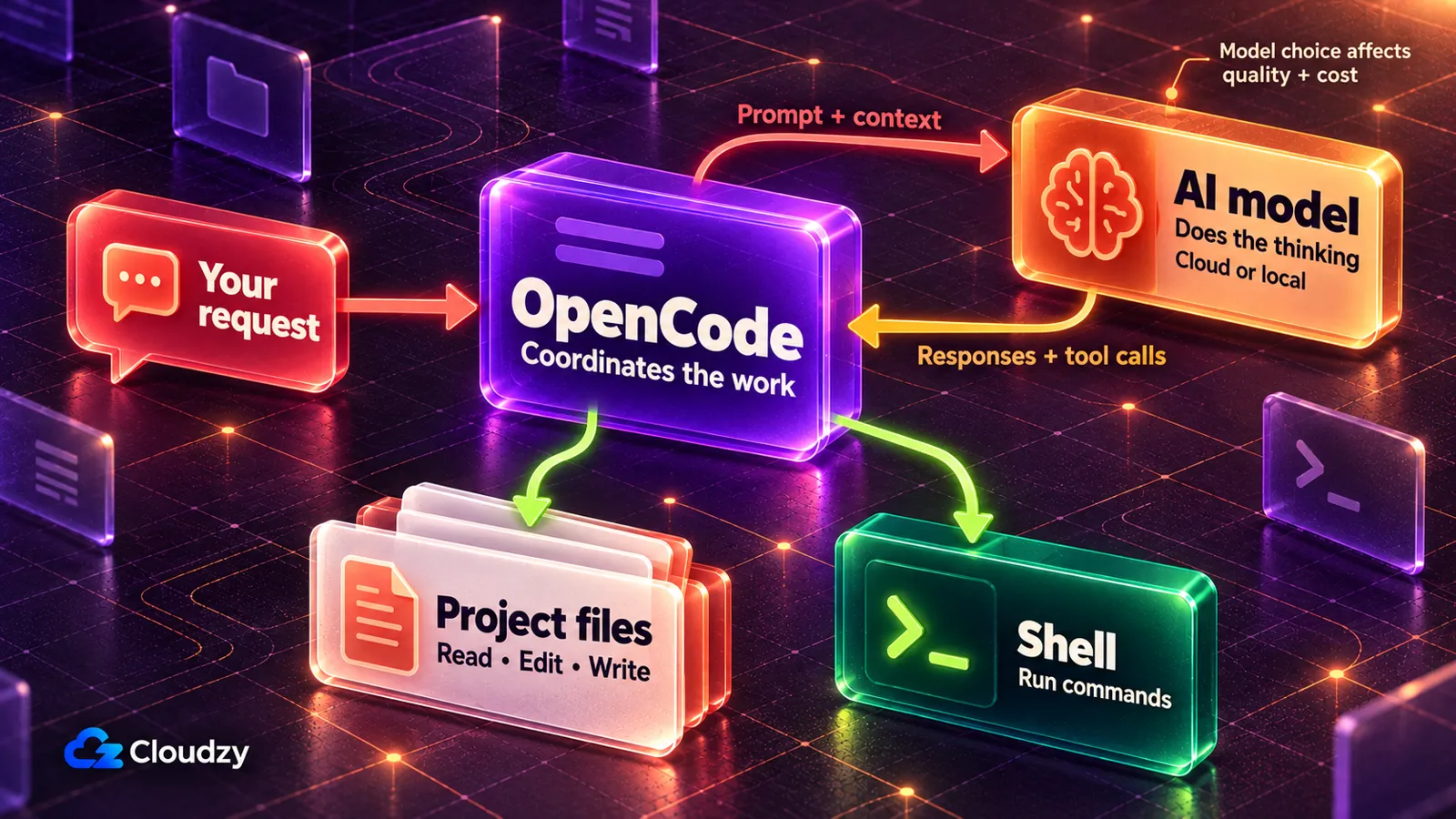
You open OpenCode in a folder, describe what you want in plain language, and it reads the files there, decides on the steps, edits files and runs commands to get it done. The thinking comes from an AI model you connect. OpenCode is the app that gives that model hands.
That makes the model a separate choice. OpenCode's homepage lists 75+ LLM providers through Models.dev, including local models that run on your own machine. Change the model and you change both the quality of the work and the bill.
It works in two modes. Build is the default, which the project's README describes as a full-access agent: it edits files and runs commands. Plan focuses on analysis and planning. The current agent docs say Plan blocks file edits outside its plan directory by default, but shell commands follow your permission settings. Set command approval explicitly; choosing Plan alone does not switch it on. Top-level permission settings can also override Plan's default edit restrictions.
You can run it three ways, all listed on OpenCode's download page:
- The terminal version runs in a command-line window, where you type instructions instead of clicking.
- The desktop app is an ordinary app window, with downloads for macOS, Windows and Linux.
- Editor extensions put OpenCode inside code editors such as VS Code, Cursor and Zed.
How Much Does OpenCode Cost?
OpenCode itself is free. What you pay for is the model. You can use its free models while they last, connect a ChatGPT, GitHub Copilot or GitLab Duo subscription you already have, pay a model company directly with your own API key, or buy OpenCode's Go ($10 a month), Go Plus ($40 a month) or pay-as-you-go Zen.
Here's how the six routes compare, checked on October 11, 2026. The Zen auto-reload figures below describe the v1 documentation; current Console recharge rules are configurable:
| Way to Pay | What It Costs | Good Pick When |
|---|---|---|
| Free models | Nothing, for a limited time; several may use your data to improve the model | You want to try it on work that isn't sensitive |
| Your existing subscription | No separate OpenCode fee; ChatGPT Plus/Pro and GitHub Copilot use your plan's allowance after sign-in. GitLab Duo is experimental and has separate access and credit requirements. | You already pay for one of them |
| Your own API key | Pay per use, billed by the model company | You want one specific model and accept a bill that varies |
| Go | $10 a month for a curated model selection, with 5-hour, weekly and monthly limits; optional paid overages use your Zen balance | You want a fixed monthly cost |
| Go Plus | $40 a month with higher limits | Go's limits keep stopping you mid-task |
| Zen | Pay-as-you-go, priced per 1M tokens and varying by model; reloads $20 when your balance drops below $5 unless you change it | You want OpenCode's tested models without a subscription |
"Your own API key" means signing up with a model company such as OpenAI, pasting the key it gives you into OpenCode, and paying that company for what you use. That use is priced per million tokens. A token is roughly a chunk of a word, so a long document costs more to process than a short question, and the same text can count as more tokens on one model than on another.
The free route comes with two conditions. OpenCode's Zen docs mark each free model as available for a limited time, and the privacy section says that, for several of them, during the free period collected data may be used to improve the model. NVIDIA's free endpoints go further and tell you not to submit personal or confidential data at all. My pick: keep client files and anything personal away from the free models.
Claude is the notable gap. OpenCode no longer supports a Claude Pro or Max subscription: the provider docs say Anthropic explicitly prohibits the plugins that do this, and OpenCode stopped bundling them in version 1.3.0.
The Zen row is the one to read twice before you add a card. Auto-reload is on unless you turn it off, and the same docs page warns that with auto-reload enabled, Zen might end up charging you more than the monthly usage limit you set. If you want a hard ceiling, switch auto-reload off rather than trusting the limit alone.
Cost and plans: 4 out of 5. Starting costs nothing, or nothing extra. It loses a point because the free route is temporary and comes with a data trade, and pay-as-you-go needs auto-reload switched off before it's predictable.
What OpenCode Does Well
Its biggest strength is choice. You aren't tied to one AI company, and you can move to a better or cheaper model the day one appears while the app and your settings stay the same. Two traits help someone who can't review its work. It tested more thoroughly in one independent comparison, and it has a planning-focused Plan mode.
The model does the thinking, so it sets the ceiling on quality. An independent head-to-head shows what the tool adds on top. In January 2026, Builder.io's Alice Moore ran OpenCode and Claude Code on the same four tasks with the same model, Claude Sonnet 4.5, in clean, identical setups. Claude Code finished in 9 minutes 9 seconds in total; OpenCode took 16 minutes 20 seconds. On the test-writing task, OpenCode wrote 94 tests and executed the entire test suite, meaning the project's full set of existing automated checks, while Claude Code wrote 73 and checked only those. My read of that one dated test: with the model held constant, OpenCode was slower and more careful.
Plan mode helps people who can't read code discuss the proposed work before implementation. It is not a guarantee that nothing can change: shell commands follow your permission settings, and settings can override the default edit restrictions. For someone who can't judge the changes afterwards, reviewing the plan beforehand is useful, alongside approval prompts and a backup.
The project is open and busy. It's released under the MIT license, which means you can use it at no cost, including for paid work, and anyone can read the code. The homepage reports over 208,000 GitHub stars and 950 contributors, and says more than 16 million developers use it every month, which is OpenCode's own count rather than an independent one.
Capability and model choice: 5 out of 5.
Can You Use OpenCode Without Coding Experience?
Yes, for work on your own documents, research and data, where people without a coding background describe using it productively. It's harder going if the goal is to build and launch software on your own, where the biggest obstacle is knowing whether the result works when you can't read the code behind it.
In a r/opencodeCLI thread about non-coding uses, a social media manager who says they know next to nothing about code keeps the context for their job in one folder and uses OpenCode for document drafts, trend research, competitive analysis and profile audits. A marketer in the same thread writes white papers, LinkedIn posts and YouTube scripts with it, feeding it files that set out hooks, writing style and rules. Others there describe analyzing real estate parcel data, and one suggests asking an agent to build a spreadsheet as a CSV file to import into Excel.
Those accounts point to sensible first jobs:
- Drafting and revising documents from a folder of notes and style rules.
- Collecting research or competitor notes into files it saves for you.
- Cleaning up, reorganizing or summarizing a spreadsheet or CSV file.
- A small personal tool, such as one that renames a folder full of files, as long as you try it on copies first.
Where it gets hard:
- The terminal version expects you to be comfortable typing commands. The desktop app lowers that bar.
- Changing settings means editing a small text file called
opencode.json. The safety section below shows exactly what to paste, but it's a new kind of task. - If you can't check the code, Plan mode, approval prompts and working on a copy reduce the risk, but they don't verify the result. Test the outcome, and get technical help before launching anything that handles important data.
- Add-ons that connect it to other apps, called MCP servers, are fiddly. In a thread about a beginner crash course, one commenter called setting them up the most annoying part, and the course creator left them out because they take a lot of explaining.
In a r/vibecoding thread, someone with no technical background asked whether to start with OpenCode or Claude Code for automations. One commenter recommended Claude Code for a total beginner, but suggested OpenCode for someone who isn't in a rush and wants to learn how different AI systems work. My read: that advice matters most when the goal is building software from scratch. For documents and data, the working accounts above are the better guide.
Free learning material exists, though none of it is official. opencode.school is an English course for people new to AI coding agents, built around the desktop app, and learnopencode.com is a Chinese-language course with a separate track for content creation.
Ease of use without coding experience: 3 out of 5.
Is OpenCode Safe to Use?
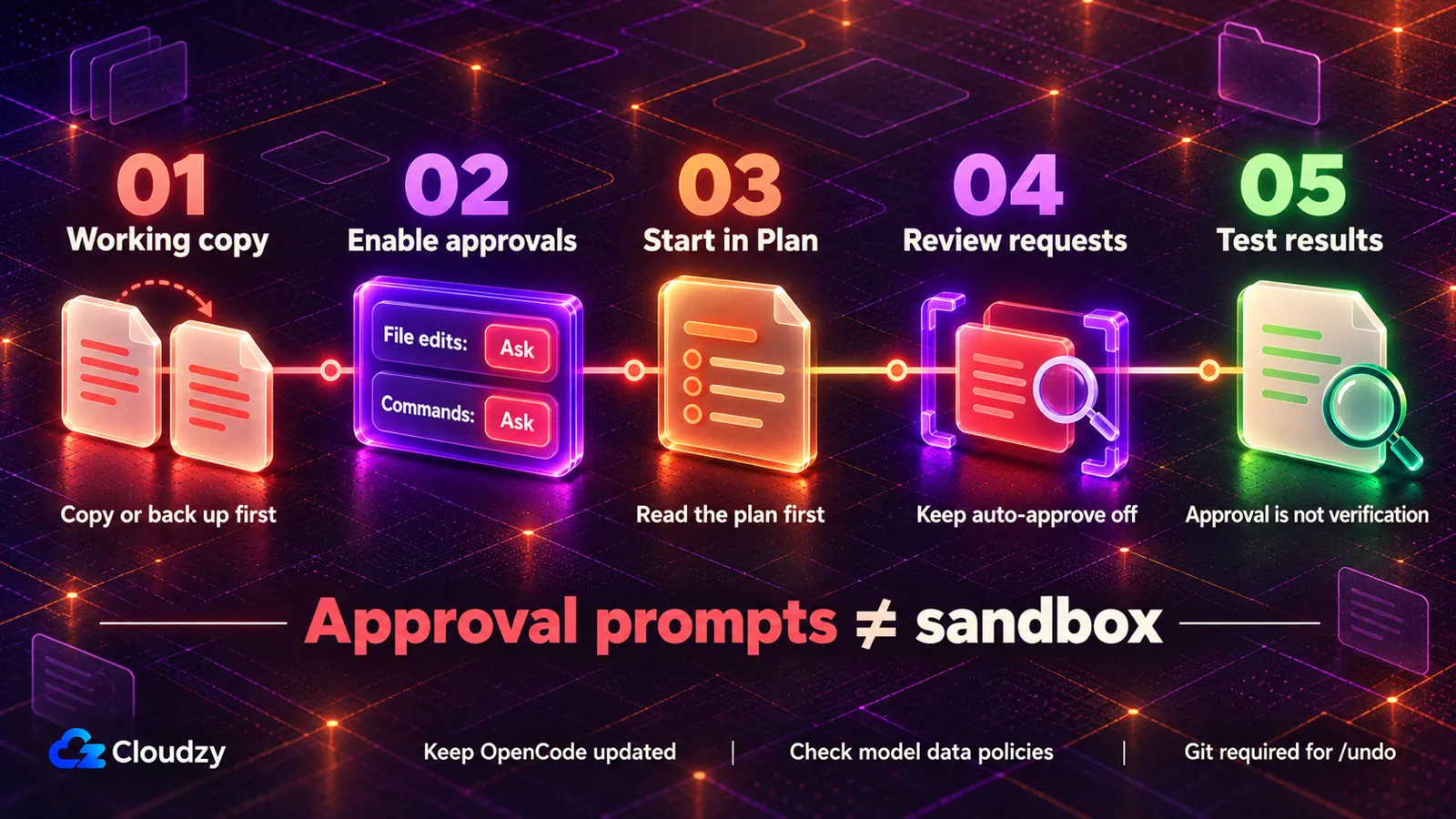
It can be reasonable to try on backed-up, non-sensitive files once you switch on approvals. Those prompts aren't a security sandbox. Out of the box, OpenCode's main mode edits files and runs commands without asking. A high-severity flaw disclosed in January 2026 has been fixed, but the first report of it went unanswered for about two months.
The permissions page is blunt about the default. If you don't specify anything, OpenCode starts from permissive defaults, and most permissions default to "allow," which covers editing files and running commands. By default, its tools ask before accessing paths outside the project, and its read tool blocks most .env files, with .env.example allowed. These are tool-level rules: an approved shell command can still read secrets or affect files elsewhere.
Five habits make it reasonable to try on real files:
- Start every new job in Plan mode (the Tab key in the terminal version), so you read its plan first. Configure command approvals too; Plan mode alone does not require them.
- Switch on approval prompts with the small settings file shown below.
- Work on a copy of the folder, or one you've backed up, until you trust the results.
- Use
/undoto roll back the last round of changes, with one condition: OpenCode's docs for the terminal version say it uses Git to manage the file changes, so it only works if the folder is a Git repository (a folder with version tracking switched on). If yours isn't, your backup copy is your undo. - Don't start OpenCode with
--autoor switch on auto-approve from the command palette. Either one approves every request that isn't explicitly blocked.
For habit 2, create a file named opencode.json in the folder you're working in and paste this into it:
{

  "$schema": "https://opencode.ai/config.json",

  "permission": {

    "edit": "ask",

    "bash": "ask"

  }

}
To make these your default permissions, add the same permission settings to ~/.config/opencode/opencode.json. If that file already exists, merge them into it rather than replacing the whole file. Project and agent settings can override these defaults.
The security record's main entry is CVE-2026-22812, rated high severity at 8.8 out of 10. Versions before 1.0.216 quietly started a local web service with no password, so another program on your computer, or a malicious website you visited, could make OpenCode run commands as you. The project's security advisory lists 1.0.216 as the fixed version and records that the reporter emailed the security contact on November 17, 2025 and got no response. The advisory went public on January 12, 2026. I'm reading it as a user would, not auditing the code, and for a user the action is simple: keep OpenCode updated. Version 1.18.33, released on September 28, 2026, already included this fix. Install the latest official release rather than treating that version as current.
Where your text goes is the other half of the question. OpenCode says it does not retain your code or context on its service during ordinary use. The app does store session data locally, cloud models receive the context needed for requests, and using /share uploads the conversation and associated data. Separately, it sends your first message in a session, including any files or images attached to it, to a second model request whose only job is writing the session's title. An open GitHub issue from September 22, 2026 asks for attachments to be left out of that request unless you opt in. Until that changes, keep sensitive attachments out of the first message unless you've verified the title model's data handling. Later messages still go to your main model, so check that provider's policies too.
Safety and privacy defaults: 3 out of 5. In my judgment a few minutes of settings reduce the risk of accidental changes, but the defaults favor speed over caution, and the response to the 2025 report was slow.
Where OpenCode Falls Short
In March 2026, OpenCode removed its built-in login for Claude subscriptions after legal requests from Anthropic. Four months later, a redesign pushed two existing users in one Hacker News thread to complain, and one of them went back to the old version. The weak spot is predictability.
The Claude loss came from Anthropic's side. In February 2026, The Register reported that Anthropic had revised its legal terms to spell out its ban on third-party apps using Claude subscriptions, after starting to enforce it in January. On March 19, 2026, OpenCode merged a change titled "anthropic legal requests" that removed its built-in Anthropic login plugin and other Anthropic references. Claude models still work, but not through a Claude subscription: you can pay per use with your own Anthropic API key, through OpenCode's Zen or a gateway such as Vercel AI Gateway, or use the Claude models included in a paid GitHub Copilot plan, which draw on its monthly usage allowance. My view: any tool that depends on another company's goodwill can lose a feature overnight, and OpenCode's many-provider design is also why losing this one left other routes open.
The redesign is the other source of churn. In a Hacker News thread from July 2026, one user who updated to the new interface downgraded again because support for running parallel work safely was gone and switching between sessions stopped working as before. An OpenCode team member replied that workspace support is being reworked, and that GitHub issues have been hard to keep on top of because "we deal with a ton of noise/spam." Another user said they were in the same boat, and that OpenCode has been their daily driver for a while.
The documentation lags too. On September 29, 2026, OpenCode's provider docs still walked through a "Claude Pro/Max option" a few lines above the note saying OpenCode no longer bundles those plugins. Frequent releases bring fixes quickly, and they also move things you're used to.
Project stability and track record: 3 out of 5.
Who Should Use OpenCode, and Who Shouldn't
OpenCode fits people who want an agent working on their own files and care more about cost and choice than about hand-holding. It fits less well when the tool itself has to teach you how to build software, or when the AI subscription you already pay for is Claude.
Install it if one of these describes you:
- You already pay for ChatGPT Plus or GitHub Copilot and want an agent working on your documents, research or spreadsheets at no extra cost.
- You want to try an agent without paying, on work that isn't sensitive, and you'll switch on approval prompts first.
- You want to be able to change AI companies or models without changing tools.
Start somewhere else in two cases. If you want to build and launch a full app alone, with nobody to check the result, begin with Claude Code, which is easier to start with than OpenCode because Anthropic handles more of the setup for you. If the Claude Pro or Max subscription you already pay for is the reason you're looking, OpenCode no longer supports it, so it's the wrong tool for that job.
If neither list quite fits, other agents in the same space, such as Aider, Cline and Continue, make different trade-offs between control and convenience.
Frequently Asked Questions
Is OpenCode the Same as OpenClaw?
No. OpenCode is a coding agent that works inside a project folder on your computer. OpenClaw is a separate always-on assistant that connects chat apps, tools and scheduled tasks, and the split between a coding agent and an assistant gateway decides which one a job needs.
Is OpenCode the Same as the Older opencode Project or Crush?
No. The older github.com/opencode-ai/opencode project, which is written in Go, is archived and has continued under the name Crush, developed by its original author and the Charm team. OpenCode, made by Anomaly, lives at opencode.ai and github.com/anomalyco/opencode. Other look-alike domains aren't official.
Can OpenCode Work Without Sending Your Files to an AI Company?
Yes, if you connect a local model through a tool such as Ollama, LM Studio or llama.cpp, though your computer needs enough memory to run the model. Also make sure title generation uses your local model: check small_model and any explicit title-agent model override. Disable session sharing, and review any MCP servers or other external integrations before treating the setup as local-only.



Discussion
Comments
Sign in to join the discussion.