
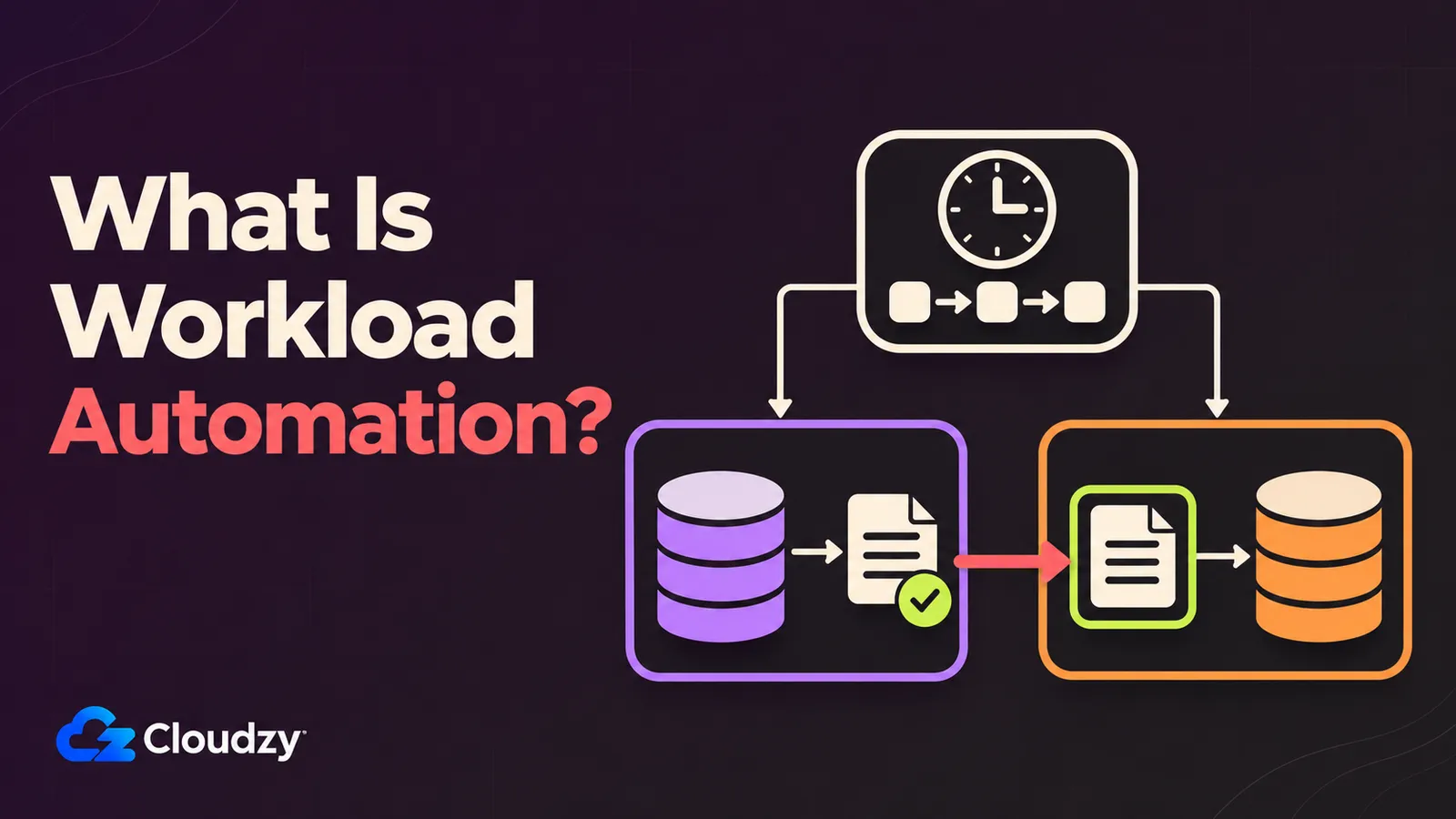
Picture two lines in a crontab: an export that starts at 01:00 and a warehouse load that starts at 02:00. The hour between them is the only thing saying "run the load after the export finishes." But on the night the export runs long or fails halfway, the load still starts at 02:00, reads yesterday's file and exits cleanly. Unless someone reads the export's error mail, nobody notices, because from cron's point of view both jobs ran on time.
Workload automation lets the warehouse load wait for a successful export. The term mostly lives on vendor pages and in enterprise IT, attached to products like Control-M and AutoSys, and it shares half its vocabulary with workflow automation and robotic process automation. The differences come down to what each tool runs and how it starts.
The Short Version
- Workload automation (WLA) runs dependent IT jobs (data loads, file transfers, ERP batch runs) across many servers from one place, with retries, run history and failure alerts.
- Cron starts a command at a scheduled minute on one machine and mails the output; job ordering, cross-host coordination and run history are left to you.
- Workflow automation connects apps on events (n8n, Zapier) or routes approvals between people, and robotic process automation (RPA) drives an application's screen the way a person would. WLA runs jobs on servers, behind the applications that both of those work with.
- Overlapping cron runs are a lock or job-design problem, fixed with
flockor a better-behaved job, not a reason to buy a WLA product.
What Is Workload Automation?
Workload automation (WLA) is software that runs IT jobs, such as nightly data loads, file transfers and ERP batch runs, in order across many machines from one place. It starts jobs on a schedule or an event, holds each job until its dependencies succeed, retries failures, keeps a run history and alerts on failures or overruns.
In scheduler terms, a dependency is a rule about outcomes, not times: run the load only if the export succeeded, and page someone if it failed. A time gap only encodes a guess about how long the first job takes. Around that core, WLA vendors' capability lists overlap heavily:
- Dependencies between jobs, including branches for failure
- Triggers by time, by business calendar (working days only, public holidays skipped) or by event, such as a file arriving
- Remote execution through installed agents, agentless connections or service integrations, depending on the product and target
- Retries, timeouts and termination of hung jobs
- A run history of what ran, where, when, for how long and with which exit status
- Failure alerts, runtime-overrun alerts when a job exceeds a configured duration, and SLA alerts when a job or workflow risks missing its required completion deadline
- Missed-run recovery, so a job that came due while a host was down runs once it is back
IBM describes IBM Workload Automation as a platform for coordinating unattended and event-driven jobs across hybrid environments. In plain terms, it means jobs that run with nobody at the keyboard, started by a clock or an event, across mainframe, on-premises and cloud machines, and driven by one scheduler. The capability list behind that sentence is accurate. But the vocabulary makes it hard to compare with the cron jobs you already run. BMC's Control-M, AutoSys, Redwood RunMyJobs, ActiveBatch, Tidal and JAMS use the term too.
Workload Automation vs. Cron, Workflow Automation, and RPA at a Glance
The four differ in what triggers them, what they run and where. Cron runs a command at a set time on one machine. Workload automation runs server jobs across many hosts, triggered by time, events or other jobs' outcomes. Workflow automation calls app APIs or waits on people. Robotic process automation (RPA) mixes screen actions with API calls.
| Aspect | Cron | Workload Automation | Workflow Automation | RPA |
|---|---|---|---|---|
| What triggers it | A time | Time, calendars, events, other jobs' outcomes | App events, form submissions, schedules | A schedule, an event or a person |
| Unit of work | A command | A job on a host: script, batch run, transfer, ERP job | A step that calls an app's API | A recorded sequence of UI and API actions |
| Where it runs | One machine | Multiple hosts and services through agents, agentless connections or integrations, under central control | The automation platform, calling SaaS APIs | A bot runtime on a desktop or server session |
| Dependencies and failures | None built in; output is mailed | Dependency graph, retries, alerts, run history | Error branches and retries per workflow | Exception handling per bot |
| Example tools | cron | Control-M, AutoSys, IBM Workload Automation; same job shape: Rundeck, Dagu, Kestra | n8n, Zapier; BPM suites for approvals | UiPath, Automation Anywhere |
Is Cron a Workload Automation Tool?
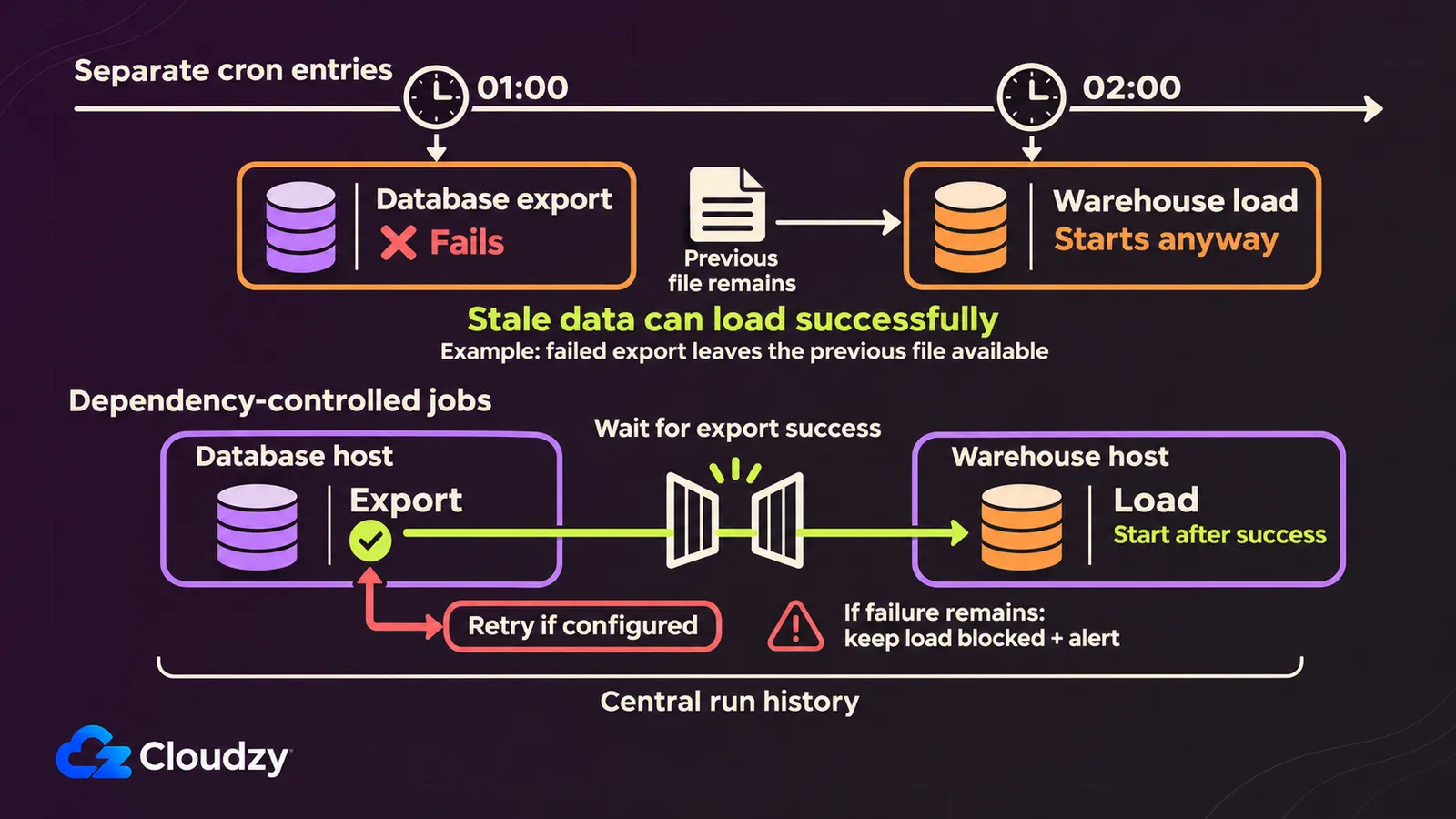
No. Cron is a time-based job scheduler for a single machine. According to the cron(8) man page, cron checks every job each minute to see whether it is due and mails any output to the crontab's owner. Running jobs in order, coordinating hosts, keeping history and raising alerts are left to the operator.
The crontab(5) page adds that MAILTO="" switches that mail off, which is also the one-line way to make a failing job produce no cron email. An export at 01:00 and a load at 02:00, with the usual workaround underneath:
# BEFORE: illustration only; do not install these commented entries.
# 0 1 * * * /opt/jobs/export-orders.sh
# 0 2 * * * /opt/jobs/load-warehouse.sh

# AFTER: replace both old entries with this single entry.
# The load runs only if the export exits successfully.
0 1 * * * /opt/jobs/export-orders.sh && /opt/jobs/load-warehouse.sh
The && line looks like a dependency. But it covers one host and one exit code, and that leaves five gaps. There is no "run after job X succeeded" or "run job Y if job X failed" outside that single line. There is no coordination across hosts, so a load on the warehouse server cannot wait for an export on the database server. There is no run history beyond what each script logs, and no alert beyond mailed output (silent when nobody reads the mail). And nothing in cron(8) re-runs an entry whose minute passed while the host was down; the page notes that the system's daily, weekly and monthly jobs, which /etc/crontab used to carry, now run by default through anacron, a separate tool. Marker files, wrapper scripts and && chains are the workarounds people build around exactly these gaps.
BMC states the vendor-side distinction in its job scheduling vs. WLA explainer. It describes job scheduling as running batches on one platform and workload automation as centrally coordinating dependent jobs across servers and environments. BMC gives the Windows Task Scheduler as an example of the job scheduler that every major operating system includes. My reading is that cron belongs in that class too (it is the Linux and Unix counterpart), and that the dividing line is scope: one platform versus many, with dependencies running between them.
Which WLA Features You Already Have Without a WLA Tool
Three common tools cover parts of the workload automation (WLA) feature list. A systemd calendar timer (OnCalendar=) with Persistent=true catches up on a run missed while the machine was off. A Kubernetes CronJob with concurrencyPolicy: Forbid skips a run while the previous one is still going. flock stops two copies of a cron job from overlapping. None needs a WLA product.
The systemd.timer manual says that with Persistent=true, the last trigger time is stored on disk and "the service unit is triggered immediately if it would have been triggered at least once during the time when the timer was inactive." You get one catch-up activation for missed calendar runs on that host, at the cost of two unit files instead of one crontab line; a side-by-side of cron and systemd timers shows what the extra setup buys.
The Kubernetes CronJob documentation makes Allow the default concurrencyPolicy, which runs both copies; Forbid skips the new run and Replace swaps the running job for it. Outside Kubernetes, flock(1), a tool to "manage locks from shell scripts," holds a lock for as long as the wrapped command runs, and with -n a second copy fails instead of waiting, so */5 * * * * flock -n /tmp/sync.lock /opt/jobs/sync.sh never stacks two syncs.
Overlapping or piling-up runs are fixed with a lock or in the job, not by changing schedulers. A five-minute job that sometimes takes ten is asking for twice the time its slot allocates. A lock stops the pile-up, and the rest of the fix is in the job (make it faster, give it more resources, or run it less often). A WLA product would change where the overrun gets reported, not the fact that it overruns. In an r/sysadmin thread on overlapping cron jobs, the top-voted reply is a lock check, flock comes up again and again, and one reply sums up the scheduler's side: "Cron runs commands. It does that very well."
What none of the three gives you is a dependency graph across hosts, or a central run history, and those two are where WLA-shaped tooling starts to earn its cost.
How Workload Automation Differs From Workflow Automation
Workload automation and workflow automation differ in what gets run and where, not in whether a person is involved. The first runs scripts, data loads and file transfers on servers. The second chains app APIs (an n8n or Zapier flow that turns a form submission into a CRM record) or routes approvals through a business process management (BPM) tool.
Three things share the word. The first is workload automation itself. The second is integration-style automation, which n8n's documentation calls "a fair-code licensed workflow automation tool that combines AI features with business process automation"; n8n and the other self-hosted Zapier alternatives chain a trigger in one app to calls into others. The third is BPM, where forms and approval chains hold each step until a person acts.
Stonebranch, a WLA vendor, puts the border at people instead. In a 2022 post comparing the two, it says workflow automation steps "are typically person-to-person," used for approval processes, while WLA tasks "typically do not include person-to-person interactions." The test sorts BPM correctly. But an n8n flow that copies web-shop orders into a spreadsheet has no person in it either, so by the same test it would land on the WLA side, next to a mainframe batch run. That is why I place the border on the thing being run: jobs on infrastructure, calls between applications, or steps that wait for people.
The word "workflow" divides nothing on its own. BMC markets Control-M as a way to "orchestrate business-critical workflows across mainframe, cloud, distributed, and SaaS environments," and Apache Airflow's documentation calls Airflow a platform for "developing, scheduling, and monitoring workflows."
The tools share some triggers. n8n flows can start on a clock (one self-hosted social posting setup fires a Schedule Trigger a few times a day). Workload automation schedulers can also start jobs in response to events, such as a file arriving.
How Workload Automation Differs From RPA
Workload automation runs jobs on servers, behind an application's interface. Robotic process automation (RPA) works in front of it, with bots that click, type and copy values the way a person would. RPA can call APIs too; driving a user interface is what sets it apart.
IBM's RPA explainer keeps both halves in view: "RPA combines APIs and user interface (UI) interactions to integrate and perform repetitive tasks between enterprise and productivity applications." UiPath, which sells RPA, puts the weight on the screen, describing bots that work "by mimicking human actions in interacting with screens and systems." Stonebranch frames the split from the WLA side: WLA "manages back-end system processes and data flows, while RPA (robotic process automation) typically automates front-end, UI-based human tasks." As I see it, where an application offers an API or a batch interface, a scheduled job can call it directly, and RPA earns its place when the only door into a system is the screen.
Where Airflow, Rundeck, Kestra, and Dagu Fit
Several open-source tools do the job of workload automation, running scheduled and dependent jobs with retries and run history, without using the term. They describe themselves as orchestrators, runbook automation or workflow engines. Apache Airflow centers on data pipelines. Rundeck, Kestra and Dagu cover operations jobs and general scheduling.
Each one, in its own words:
- Airflow: "Airflow workflows are defined entirely in Python," for work that includes batch data pipelines, machine learning and model training (Apache-2.0).
- Rundeck: "an open source runbook automation service with a web console, command line tools and a WebAPI" that deploys automation across a set of nodes (Apache-2.0).
- Kestra: an event-driven platform for orchestration and scheduling (Apache-2.0).
- Dagu: turns "existing scripts and runbooks into production workflows with scheduling, retries, human tasks, and run history," with jobs defined in YAML (GPL-3.0).
Stonebranch’s position, from its WLA FAQ, is that Airflow-class tools "are built specifically for data engineering workflows," and that WLA "can actually trigger and manage Airflow jobs" within a larger estate, a vendor's framing that still matches Airflow's own data-first description. For an ops team, the practical difference is how jobs get defined and who can maintain them. In an r/sysadmin thread asking for a free Control-M, the poster rejected Airflow’s Python DAGs and raised the same concern about Kestra. That captures one team’s experience, but Kestra now provides a No Code editor for building workflows through forms without writing YAML. Check the current authoring experience against the people who will maintain the jobs.
What Happened to the Workload Automation Magic Quadrant?
Gartner now covers this market as Service Orchestration and Automation Platforms (SOAP). BMC's announcement says the first Magic Quadrant for SOAP was published in September 2024, and BMC summarizes Gartner's definition as combining workflow orchestration, workload automation and resource provisioning. The job-running core of a SOAP is still workload automation.
A Gartner Magic Quadrant for Workload Automation did exist before that. SOS GmbH, the company behind JobScheduler, announced its placement in that report, which Gartner published in February 2012.
A suite like Control-M now sits in a SOAP quadrant and sells itself on workflow orchestration, which I read as the analyst category getting wider around the same job-running core. So when a vendor page leads with SOAP, expect a workload automation scheduler at the center of what it sells.
Matching Your Jobs to the Right Kind of Tool
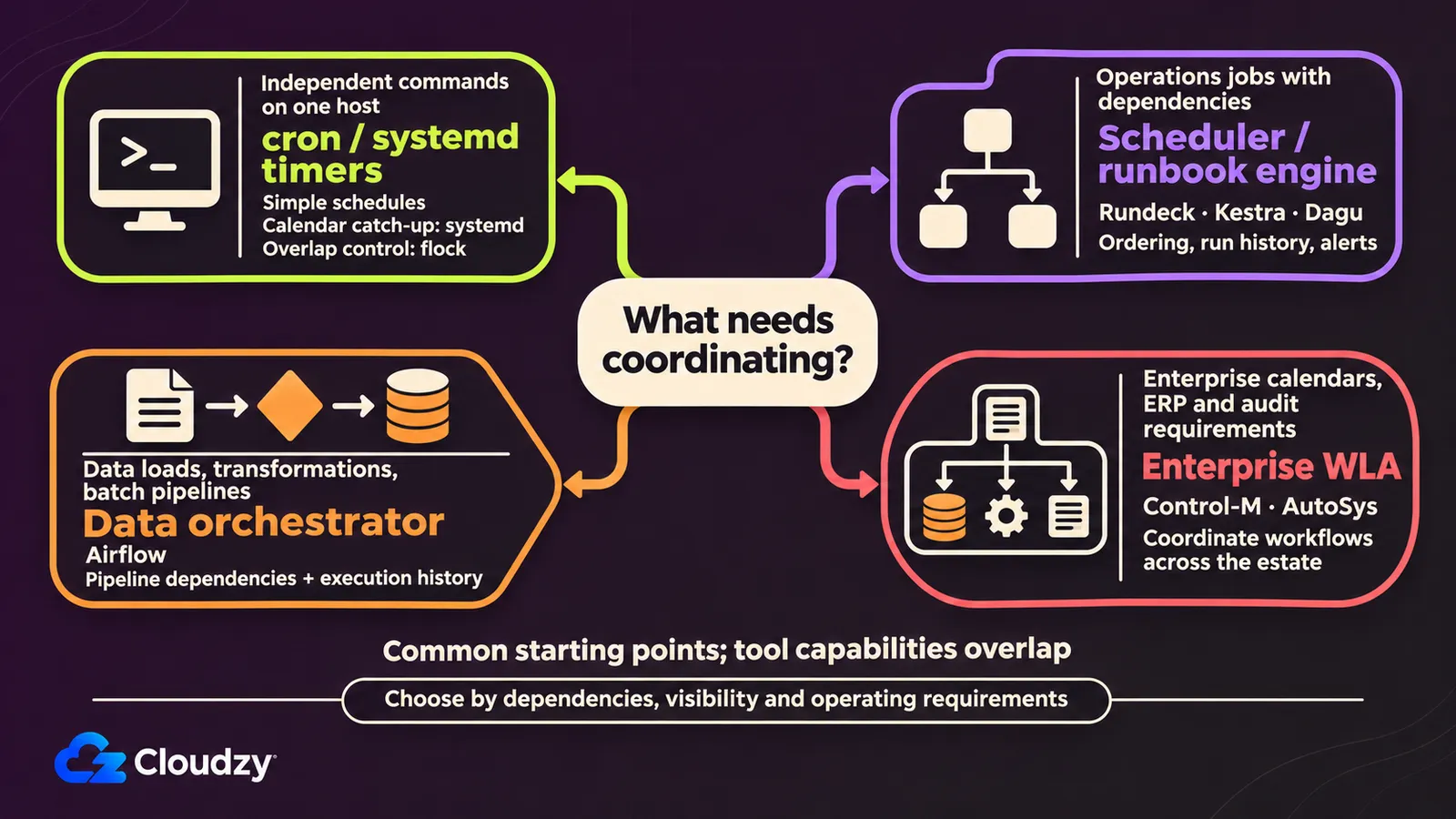
The shape of your jobs decides the tool class. Independent jobs on one host need cron or a systemd timer. Dependent jobs across a few hosts that need run history and alerts fit an open-source scheduler or orchestrator. Organization-wide estates with business calendars, ERP batch runs and audit requirements are the territory of enterprise workload automation suites.
On the first rung, put flock around anything that can overrun and Persistent=true on OnCalendar= timers that need to catch up after downtime. The middle rung is the class of Rundeck, Kestra and Dagu, and it covers the case of a set of cron jobs that only need ordering; data pipelines go to an Airflow-class orchestrator instead. The top rung adds month-end calendars, mainframe and ERP jobs, and auditors who want a record of every run. Control-M, AutoSys and other enterprise WLA and SOAP suites target this type of environment.
Job count is a weak signal for moving up a rung. The strong ones are a job that must wait for another job's outcome on another machine, and a morning when nobody can say what ran last night without logging in to each box. A time-gap chain is cheap until the first night it runs out of order; after that, the cost is rework: re-running the load, finding which reports read stale data, and explaining the numbers. Start by listing every scheduled job you run, marking which ones depend on another job's result, and noting how long it would take you to find out what ran on each host. If the dependency column stays empty and that answer is "a minute," cron is already the right tool.
Frequently Asked Questions
Is Apache Airflow a Workload Automation Tool?
Apache Airflow runs data pipelines written in Python (batch loads, machine learning, model training) as scheduled, dependent jobs with a run history, which is WLA-shaped work for data teams. Airflow's documentation describes it as a workflow platform, though, and it does not use the workload automation label.
What Are Examples of Workload Automation?
A nightly database export followed by a warehouse load on another server, an end-of-day file transfer to a partner, ERP batch runs at month-end, and a backup chain that verifies each copy before the next step starts. A workload automation tool can schedule each job and hold any dependent step until its prerequisite succeeds.
What Does SOAP Mean in Workload Automation?
Here SOAP stands for Service Orchestration and Automation Platform, Gartner's current name for the category. By BMC's summary, that is workload automation with workflow orchestration and resource provisioning added around it. It is unrelated to SOAP the web services protocol, the XML messaging standard published by the W3C.
Is Workload Automation the Same as Job Scheduling?
Close, but not the same. BMC notes that every major operating system ships a job scheduler for jobs on that machine, such as Windows Task Scheduler, and cron plays that role on Linux. Workload automation is what you add once jobs on different servers depend on each other. In BMC's terms, the split is one platform versus many.
Discussion
Comments
Sign in to join the discussion.