

n8n VPS Hosting

n8n VPS Hosting

One-Click n8n Server VPS

One-click gets n8n Community Edition running on Ubuntu 24.04 with Postgres, Redis, and Traefik prewired. Log in over SSH, point a subdomain, and finish setup in your browser.

Excellent
TrustPilot Stars
500+ reviews on

There’s a reason 117,000+ developers & businesses choose us.

University of Toronto UTFR Ignyte 5pm Agency Zare Webhades
100% DDoS Protection
0 Days

Money-Back Guarantee

24/7 Support
0/0

Online Support

Network Speed
0Gbps

Network Speed

Network Uptime
0%

Network Uptime

PRICING

Transparent Pricing. No Hidden Fees

There's (definitely more than) a reason 0+ developers & businesses choose us.

  • Pay Yearly (50% OFF)
  • Pay Monthly (40% OFF)
  • Pay Hourly (35% OFF)
  • Default
n8n VPS

What is n8n VPS?

n8n is an open-source workflow automation platform that connects apps, APIs, and databases through a visual editor. It helps teams automate repetitive work and keep integrations in one place.

Cloudzy’s n8n VPS hosting is a one-click Docker stack on Ubuntu 24.04: n8n (latest), PostgreSQL 16, Redis 6 Alpine, and Traefik for HTTPS. You get dedicated vCPUs, DDR5 RAM, NVMe storage, up to 40 Gbps networking, a 99.99% uptime SLA, full root access, and snapshots for safe changes.

n8n VPS
n8n VPS Features
  • check
    One-Click Deployment
  • check
    DDoS Protection
  • feature icon
    Full Admin/Root Access
  • check
    Various Payment Methods
  • check
    Latency-Free Connectivity
server
Active VPS 0
shield
0 Money-Back Guarantee
Cloudzy's n8n VPS Use Cases

Who's It For?


Developers and DevOps

Run CI triggers, webhooks, and API glue on an n8n VPS server with SSH access for logs, updates, and custom containers.

Deploy Now
 

Automation Specialists

Keep client automations isolated per workspace, back up flows with snapshots, and move fast with VPS hosting for n8n in one region.

Deploy Now
 

Startups and SMBs

Connect Stripe, HubSpot, Slack, and internal apps on a VPS for n8n, scaling RAM as workflows and binary data grow.

Deploy Now
 

Data and Analytics Teams

Orchestrate ETL jobs, file moves, and database sync jobs on n8n on VPS, pairing Postgres and Redis for smoother runs.

Deploy Now
 

AI Builders & Prompt Engineers

Running OpenAI prompts, enriching content, or building RAG pipelines? Self host n8n and scale your LLM workflows without hitting platform limits or extra costs.

Deploy Now
 

Marketing and Ops Teams

Automate lead routing and content ops without extra scripts, using a cheap VPS for n8n for light workloads and upgrading later.

Deploy Now
n8n VPS

Why Choose Cloudzy’s n8n VPS Hosting

Unlock the Power of Flexibility and Performance

One-Click Image on Ubuntu 24.04

Start from a one-click image that sets up Docker Compose with n8n, PostgreSQL 16, Redis 6 Alpine, and Traefik. SSH in as root, set DNS, and open the web UI.

blur

Complete Data Ownership & Root Access

Install system packages, add custom nodes, tune environment variables, and plug in monitoring agents. You keep full control over Docker, firewall rules, and logs via SSH and systemd.

blur

Scalability Without Surprise Bills

Usage-based platforms look cheap; until they aren’t. With Cloudzy’s flat-rate plans and optional pay-as-you-go billing, you can scale your workflow volume without worrying about per-run charges or tiered limits.

blur

Performance for Busy Automations

Dedicated vCPUs, DDR5 RAM, and NVMe storage keep executions steady as webhook volume rises. Up to 40 Gbps connectivity helps with API bursts, file uploads, and queue-heavy flows.

blur

Snapshots Before Risky Changes

Take VPS snapshots before importing large workflows or changing database settings. Keep secrets in /root/n8n/.env, and roll back fast if an update or config change breaks a flow.

blur

Easy installation

How to Set Up Cloudzy’s n8n VPS

Setting up Cloudzy’s n8n VPS is quick. Provision the one-click image, SSH in as root, point n8n.example.com to your server IP, review /root/n8n/.env, then start the service with systemctl. Follow our guide below, and contact 24/7 support if you get stuck.
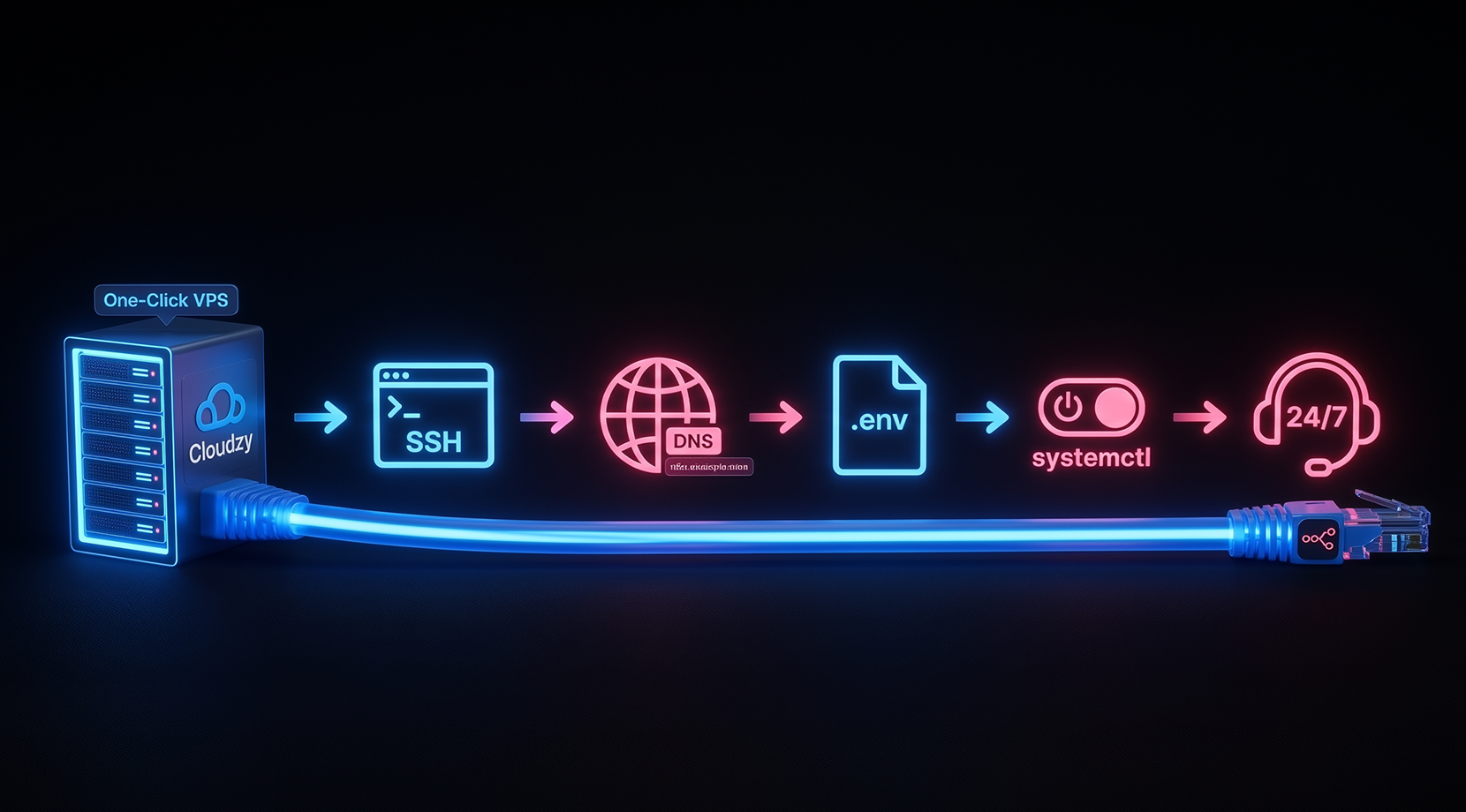
vps n8n setup flow graphic showing Cloudzy one-click VPS connected by an Ethernet cable to icons for SSH login, DNS, .env configuration, systemctl service control, and 24/7 support.

16+ Locations. Because Every Millisecond Matters

Deploy your VPS closer to users for optimal performance.

Utah
Utah United States
New York
New York United States
Dallas
Dallas United States
Miami
Miami United States
Las Vegas
Las Vegas United States
Los Angeles
Los Angeles United States
London
London United Kingdom
Amsterdam
Amsterdam Netherlands
Frankfurt
Frankfurt Germany
Switzerland
Switzerland Switzerland
Romania
Romania Romania
Coming soon
Singapore
Singapore Singapore
Dubai
Dubai United Arab Emirates
Malaysia
Malaysia Malaysia
Coming soon
Tokyo
Tokyo Japan
Coming soon
Sydney
Sydney Australia
Coming soon
network speed

0Gbps Network Speed

Network Uptime

0.00% Network Uptime

Average Latency

<0ms Average Latency

Monitoring

0/7 Monitoring

World Map Globe Globe Globe Globe Globe Globe Globe


Romania Romania
Coming soon


Malaysia Malaysia
Coming soon


Tokyo Tokyo
Coming soon


Sydney Sydney
Coming soon


Frequently Asked Questions

FAQ | n8n VPS Hosting

What is an n8n VPS used for?

An n8n VPS runs workflow automations that connect apps, APIs, and databases. It is commonly used for webhooks, scheduled jobs, notifications, and internal tool glue.

How long does it take to get my n8n VPS?

Less than 5 minutes. Once your VPS is live, the n8n environment is automatically configured. Including Docker, PostgreSQL, Redis, SSL, and background workers. 😉

What does the encryption key do on an n8n VPS?

n8n encrypts saved credentials using an encryption key. Setting a fixed key stops credentials from breaking after a move, restore, or container rebuild.

Which port does an n8n VPS use by default?

The editor and API are served on port 5678 by default. Many setups keep 5678 internal and publish only HTTPS through a reverse proxy.

How do you keep data after restarts on an n8n VPS?

Persist the n8n data directory so workflows, users, and keys survive restarts. In container setups, use a mounted volume and back up config files regularly.

Can I choose where my n8n server is hosted?

Yes. We offer VPS in 16+ locations across North America, Europe, and Asia.

Is my VPS dedicated, or shared with others?

You get your own dedicated virtual environment including root access, isolated resources, and full control over your n8n instance.

How do I access Cloudzy n8n VPS after setup?

SSH into the VPS as root, then check /root/.cloudzy-creds and /root/n8n/.env for initial values. After DNS points to your IP, open your n8n URL in a browser.

What plan specs fit Cloudzy n8n VPS hosting?

For light workflows, 2 GB RAM is a good baseline, with 4 GB for busier flows and binary data. If you want a cheap VPS for n8n, start small and resize later.

What security basics come with n8n on VPS at Cloudzy?

You control firewall rules, SSH keys, and OS updates with full root access. Traefik can terminate HTTPS, and dedicated IPv4/IPv6 helps keep webhooks consistent.

Still have questions?

Need help? Contact our support team.

ticket Submit a Ticket
Frequently Asked Questions

FAQ | n8n VPS Hosting

What is an n8n VPS used for?

An n8n VPS runs workflow automations that connect apps, APIs, and databases. It is commonly used for webhooks, scheduled jobs, notifications, and internal tool glue.

How long does it take to get my n8n VPS?

Less than 5 minutes. Once your VPS is live, the n8n environment is automatically configured. Including Docker, PostgreSQL, Redis, SSL, and background workers. 😉

What does the encryption key do on an n8n VPS?

n8n encrypts saved credentials using an encryption key. Setting a fixed key stops credentials from breaking after a move, restore, or container rebuild.

Which port does an n8n VPS use by default?

The editor and API are served on port 5678 by default. Many setups keep 5678 internal and publish only HTTPS through a reverse proxy.

How do you keep data after restarts on an n8n VPS?

Persist the n8n data directory so workflows, users, and keys survive restarts. In container setups, use a mounted volume and back up config files regularly.

Can I choose where my n8n server is hosted?

Yes. We offer VPS in 16+ locations across North America, Europe, and Asia.

Is my VPS dedicated, or shared with others?

You get your own dedicated virtual environment including root access, isolated resources, and full control over your n8n instance.

How do I access Cloudzy n8n VPS after setup?

SSH into the VPS as root, then check /root/.cloudzy-creds and /root/n8n/.env for initial values. After DNS points to your IP, open your n8n URL in a browser.

What plan specs fit Cloudzy n8n VPS hosting?

For light workflows, 2 GB RAM is a good baseline, with 4 GB for busier flows and binary data. If you want a cheap VPS for n8n, start small and resize later.

What security basics come with n8n on VPS at Cloudzy?

You control firewall rules, SSH keys, and OS updates with full root access. Traefik can terminate HTTPS, and dedicated IPv4/IPv6 helps keep webhooks consistent.

Still have questions?

Need help? Contact our support team.

ticket Submit a Ticket
Testimonial

Cloudzy, Through Our Users’ Words

Hear how 117342 developers make Cloudzy part of their workflow.

Engineering Without Interruptions

Cloudzy allows our engineering team to focus on innovation, not infrastructure. We use their high-performance servers to manage large files and software licenses, and have experienced zero technical issues or downtime since day one.

Eric
Eric

Team Captain at UTFR, University of Toronto

Run n8n on Cloudzy Get VPS hosting for n8n with Ubuntu 24.04, dedicated resources, snapshots, and a ready Docker stack. Choose a plan for your workflows, or ask our team for sizing help.
cloud











